A Practical Look at Automated Notifications for BMS Systems
In modern facility management, the Building Management System (BMS) serves as the central nervous system, overseeing everything from HVAC to security. However, the effectiveness of any BMS is directly tied to its ability to communicate critical information to the right people at the right time. This is where the implementation of automated notifications for BMS becomes a critical component of operational strategy. This article provides a detailed examination of notification systems, comparing different architectural models and outlining best practices for their deployment, with a specific focus on the role of on-premise hardware gateways.
The 3 AM Alert: Why Your "Smart" Building Is Failing to Communicate
Imagine it’s 3:00 AM. A critical air conditioning unit in your main server room fails. Your multi-million dollar Building Management System (BMS) knows it instantly. But do you? Does the on-call engineer? Or is that critical alert waiting on the dashboard until the right person arrives at 8:00 AM to see - a room full of melted servers?
This is the central failure of so-many "smart" buildings. We've invested heavily in systems that can detect everything, but we've failed to solve the most critical part: getting the right information to the right person, right now.
Effective building management hinges on the timely flow of information. But as buildings become more complex, traditional communication methods are breaking down.
The Problem: "Alert Fatigue" in a 24/7 World
If your building's alert system relies on manual dashboard monitoring or automated emails, it's already failing. The challenge isn't a lack of data; it's a lack of effective delivery.
The "Wall of Noise" and Alert Fatigue
Your BMS is chatty. It sends alerts for everything: "Filter 12 is 80% dirty," "Room 201 is 1° too warm," "Pump 3A has run for 500 hours." When a truly critical alert comes in, it looks just like the others. We've trained our staff to ignore a constant stream of low-priority notifications. When every alert is treated as "urgent," no alert is urgent.
The 24/7 Dashboard Myth
Many facilities still rely on a central dashboard for monitoring. This is a fragile solution that depends on one thing: a human being physically watching a screen, 24/7. In today's lean operations, this is not just inefficient; it's a fantasy.
The Internet: Your System's Single Point of Failure
This is the single biggest threat to modern building management. Many new notification systems are cloud-based. They are 100% dependent on a stable internet connection to function. Now, ask yourself: when is your building most vulnerable? During a crisis.
A severe storm, a power outage, or a local fiber cut. In these exact moments, the internet is the first thing to fail. If your building's internet goes down, your cloud-based alert system is completely blind. We have recently seen examples of major cloud infrastructure companies, whose infrastructure experienced several hours of downtime due to the incorrect configurations. The generator can fail, the basement can flood, and the security system can go offline, but the cloud service can't send a single notification.
The Solution: An On-Premise Hardware Gateway for Critical Alerts
The solution is to stop relying on the internet and external cloud services for your most critical messages. The solution is an on-premise hardware notification gateway.
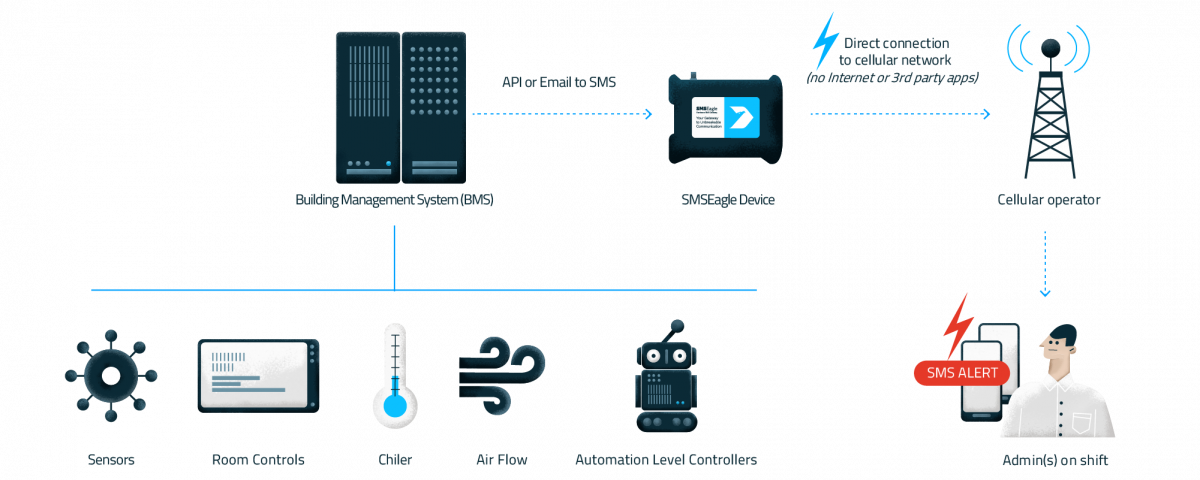
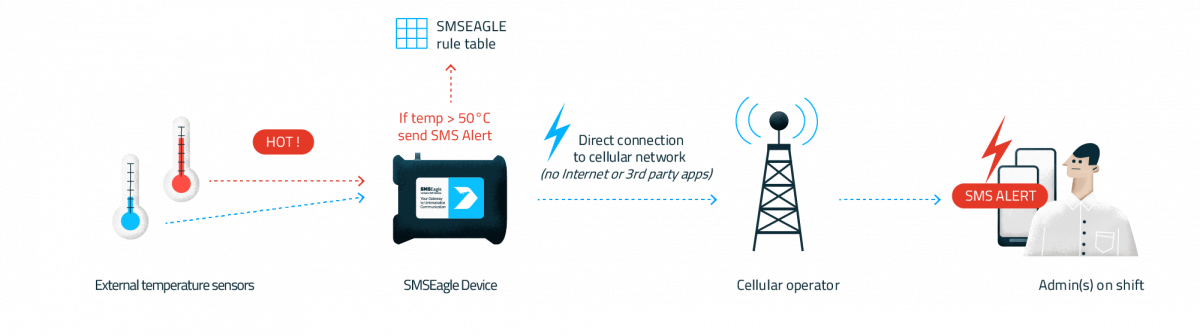
This is a physical device that sits securely inside your building. It connects directly to your BMS (or any other system) but sends its alerts out using a more robust, reliable channel: the cellular network (SMS).
A dedicated hardware gateway, like an SMSEagle, is purpose-built to solve this problem. It’s not just a modem; it's an intelligent communication hub that acts as the failsafe for your entire operation.
Addressing the critical needs of your BMS
SMSEagle can be integrated with the most popular BM / SCADA systems
Additionally we provide custom integration services to tailor SMS solutions to your specific business needs.
Over 40 features for BMS alerts:
SMS alerts & notifications
Immediate notifications about critical building system statuses, such as HVAC failures, security breaches, or fire alarms, ensuring prompt response to issues.
Voice Alerts
Text-to-speech voice messages to building management and maintenance teams for immediate attention to critical issues, such as system malfunctions or security breaches, ensuring prompt action and resolution.
Wake Up Calls are ring-only phone calls designed to notify maintenace staff about important events, ensuring that key personnel are informed and ready to respond promptly even during a night.
Built-in escalation feature manages the escalation process for alerts by sending them to a group group members until one of the users responds in time.
Sends automated reminders and alerts for routine maintenance, system checks, or energy usage reports, helping to ensure timely upkeep and efficiency of building systems.
Modem Failover
Ensures continuous communication by automatically switching to a backup modem if the primary one fails, maintaining reliable messaging capabilities during network outages.
Allows monitoring and control of physical devices and sensors in the building automation system through SMS, enabling actions like remotely resetting systems or receiving alerts from sensors directly to mobile devices.
Allows conversion of emails into SMS messages, ensuring that critical updates and alerts reach maintenance staff or security personnel who might not be checking email constantly.
SMSEagle offers reliable SMS alert systems that send instant messages to building managers and repair teams about urgent problems, system breakdowns, and upkeep reminders. This helps teams to tackle issues right away cutting down on outages and keeping buildings working at their best.
Here’s how an on-premise hardware SMS gateway directly fixes the failures of other systems and provides a clear return on investment.
It’s Reliable (It Bypasses the Internet)
Because the SMSEagle gateway has its own SIM card, it doesn't use your building's internet to send messages. When a storm knocks out your IT infrastructure, the cellular network almost always stays up. The gateway can still send an SMS from the BMS to your on-call team, warning them that the main power is down or the backup generator has failed. This operational independence is the key to reliability.
It’s Secure and Compliant (Your Data Stays Yours)
In an era of strict data privacy (like GDPR), do you really want to send your employee contact lists and building alert data to a third-party cloud service? An on-premise solution means all your data—contact lists, alert logs, and message content—stays within your own secure network. The device sends the SMS straight to the cellular carrier with no intermediary. For organizations in finance, healthcare, or government, this isn't just a "nice-to-have"; it's a requirement.
It’s Cost-Effective (A Clear TCO)
Cloud services rely on a recurring subscription model (Operational Expense, or OpEx). These monthly fees add up, and the cost often scales with the number of messages you send or users you have. A hardware gateway like SMSEagle is a one-time capital expenditure (CapEx). You buy the device, and you own it. There are no subscription fees or per-message charges from the manufacturer. This results in a significantly lower Total Cost of Ownership (TCO) over the long term.
It’s Intelligent (It Cuts Through the Noise)
A smart gateway doesn't just blast every alert to everyone. It integrates with your team’s workflow using advanced features:
On-Call Scheduling: You can use built-in shift management feature, so the system knows who is on duty, ensuring the 3 AM alert goes to the person on shift, not the one who's on vacation.
Smart Escalations: You can define a chain of command (using escalation groups). A "High-Temp" alert can be sent to the primary HVAC tech. If it's not acknowledged within 10 minutes, the system automatically escalates it to the facility manager.
The Right Channel for the Right Alert: You can use SMS and TTS voice calls for true emergencies (Fire, Security, Flood) and email for routine maintenance (Filter changes, usage reports). This stops alert fatigue and reclaims the power of the critical notification.
How to Integrate an SMS Gateway with Your BMS
You don't need a brand-new building to use this. A hardware gateway is designed to be flexible and work with any BMS, new or old.
For Modern Systems (API & Native Integration)
Most modern BMS platforms, like those built on the Niagara Framework, are designed to be interoperable. They can "speak" to other devices using a standard REST API. A gateway like SMSEagle has a full API, allowing your BMS to trigger the sending of messages, manage contacts, and check delivery statuses. For common platforms, pre-built integration plugins exist that make the setup a simple drag-and-drop process.
For Legacy Systems (Email-to-SMS)
What if your old, closed-box BMS can only send an email? No problem. You can configure the BMS to send its alert email to the SMSEagle device. The gateway instantly parses the email, extracts the critical info (like "Server Room Temp > 30°C"), and converts it into a concise SMS for the right team. This simple method adds modern, reliable SMS alerts to any system that can send an email.
SMSEagle Use Cases for Building Automation
Send SMS alerts from BMS in secure offline (no-Internet) scenario
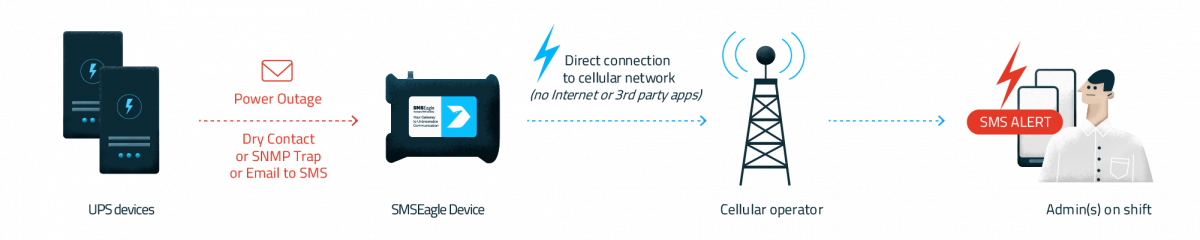
Send SMS alerts from UPS device on power outages (and other status changes)
Send SMS alerts when the temperature threshold is exceeded
Best Practices: Making Your New Alert System Effective
Deploying the hardware is just the first step. To make it truly effective, you must define clear and logical rules.
1. Establish Clear Escalation Paths
Before launching, map out your team's response structure. Define who receives an alert first, how long they have to acknowledge it, and who the alert should be escalated to if there is no response. Integrate this with your on-call schedule to ensure the automation always reaches the right person.
2. Use Severity Levels to Prioritize
Not all alerts are created equal. Classify potential issues into severity levels (e.g., Critical, Warning, Information). Use the most intrusive channel (TTS voice calls & SMS) for critical alerts only. Use SMS or email for lower-priority warnings and informational messages. This is the single best way to combat alert fatigue.
3. Craft Actionable, Informative Messages
A vague message causes confusion and delays. Create standardized message templates for different alerts. An effective alert should answer the key questions: What, Where, What Value, and When?
Bad Message:ALARM 501
Good Message:CRITICAL: Server Room Temp > 30°C (Current: 32°C). Location: Building A, 2nd Floor. Time: 14:32.
The second message provides all the necessary context for an immediate, informed response.
4. Test Your System Regularly
Don't wait for a real emergency to discover a problem. Schedule regular tests of the entire alert workflow, from the BMS trigger to the final message delivery. This validates the configuration and keeps staff familiar with the system.
What is a typical implementation timeline of hardware SMS gateway
A hardware gateway like SMSEagle requires physical installation, but its web-based interface is designed for quick configuration. A typical implementation, including basic integration and testing, can often be completed within 1-2 hours.
Don't Miss the Alerts That Matter
Your Building Management System is a powerful investment. It’s the brain of your building. But it's useless without a reliable voice.
Stop letting your most critical alerts get lost in the noise or fail because of an internet outage. By adding a secure, on-premise hardware gateway, you ensure that the right person gets the right message, right now. You can finally move from reactive (cleaning up a disaster) to truly proactive (preventing it from happening in the first place).
Frequently Asked Questions about Automated Notifications for BMS
When considering a new notification system, facility managers often have similar questions regarding implementation, capabilities, and management. Here are answers to some of the most common queries.
What is a typical implementation timeline
The timeline can vary based on the solution’s complexity. A cloud-based service can often be set up in a matter of hours. A hardware gateway like SMSEagle requires physical installation, but its web-based interface is designed for quick configuration. A typical implementation, including basic integration and testing, can often be completed within a few days.
How can we manage and reduce false positive alerts?
Managing false positives is about refining your alert triggers. Start with conservative thresholds and adjust them based on operational data. Implement alert delays (e.g., only send a notification if a condition persists for more than 60 seconds) to filter out transient spikes. Regularly review triggered alerts to identify and fine-tune rules that are overly sensitive.
The NIS2 Directive (EU 2022/2555) introduces a fundamental shift in the approach to cybersecurity risk management. An organisation’s responsibility no longer ends at its own infrastructure—it now explicitly extends to suppliers and service providers whose services are critical to business continuity.
The NIS2 Directive (EU) 2022/2555 replaces the 2016 regulatory framework, introducing harmonised cybersecurity governance requirements for essential and important entities across the European Union. One of its key operational provisions is Article 23, which defines the timelines and scope for reporting cybersecurity incidents to the relevant competent authorities and CSIRT teams.
The objective of the NIS2 Directive is to enhance the level of cybersecurity and operational resilience of organizations providing services that are essential and important for the functioning of the economy and society.