








Home / Integration plugins / Niagara 4 SMS integration
Niagara4 and SMS Eagle logos side by side, indicating a partnership or integration

Instant SMS and Voice Alerts for Niagara 4.

Never miss a critical event.

Integrating the Niagara 4 building management platform with the SMSEagle hardware SMS gateway lets you automatically send alerts about HVAC failures, power issues, or security problems. The solution creates a network-independent communication channel, which is key for keeping your facility’s monitoring running continuously.

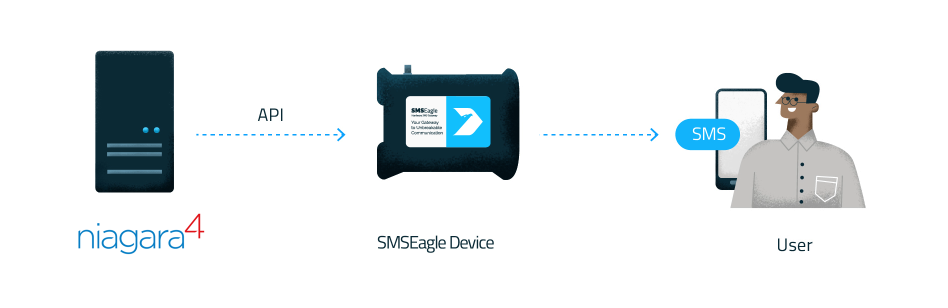
Flow from Niagara 4 server to SMSEagle device via API, then to a user receiving SMS on a mobile.

Benefits

Verified security badge: blue shield outline with a dark circle and white checkmark indicating protection and trust.

Reliable alert delivery

Ensure critical alarms are delivered via SMS even if the network or email systems fail. This guarantees visibility and response in emergency situations.

Icon depicting a hand interacting with a circular timer/clock motif and a rectangular element, suggesting a user action with time or sequencing

Faster response to incidents

Alerts go directly to technicians’ phones, reducing reaction time and minimizing downtime. No need to log into the system to be informed.

Communication tower emitting radio waves from a tall antenna structure

Independent and secure communication

On-premise SMS gateway removes dependency on external providers and cloud services. This improves security, compliance, and operational control.

How it works?

1

Event Trigger

Niagara 4 detects a fault or threshold breach.

2

Communication

Niagara sends a request to SMSEagle via local network.

3

Alert

SMSEagle sends a cellular SMS to the maintenance team.

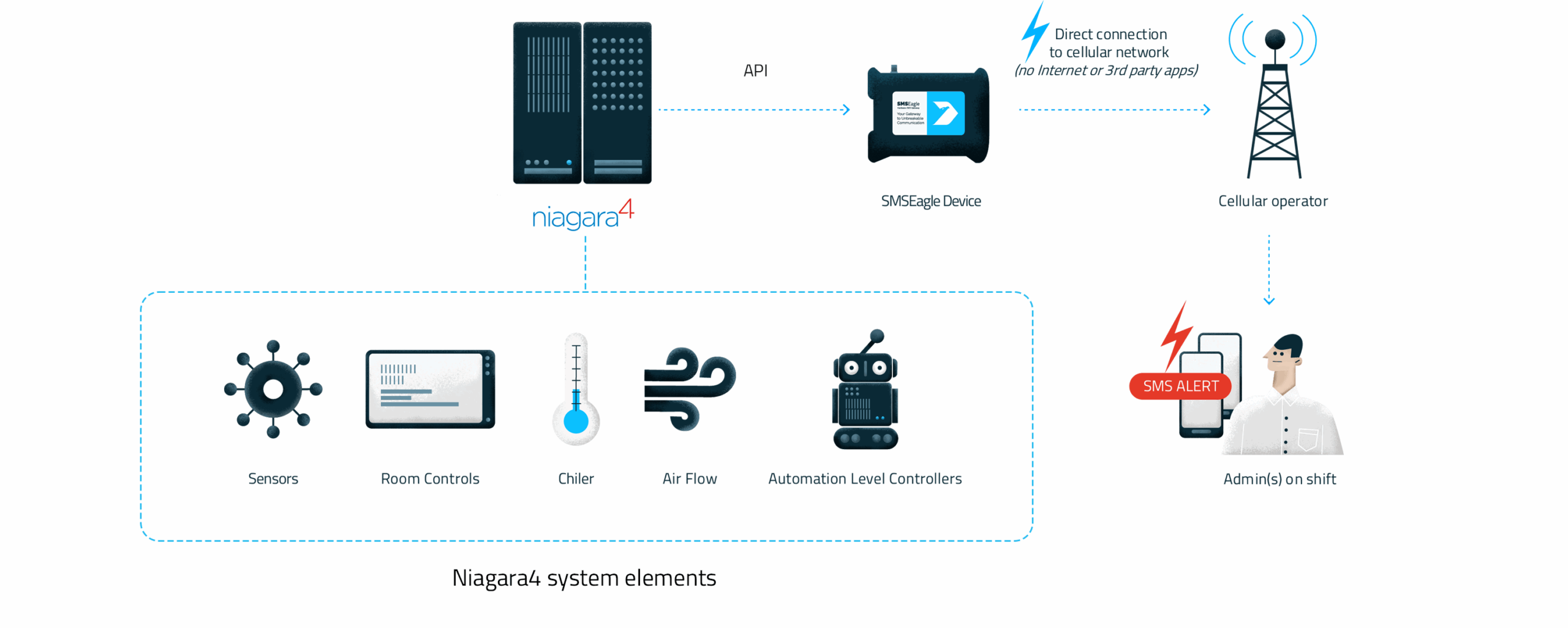
Infographic showing Niagara4 system elements: sensors, room controls, chiller, air flow, automation level controllers in a blue dashed box, feeding an SMS Eagle device via API to a cellular operator; admins on shift receive SMS alerts.

Integrate in 10 minutes

No extra apps, no new software to learn. Drag‑and‑drop integration into your existing BMS and alarm design.
99% of setup is done inside
the Niagara Station. Just enable API access on the SMSEagle device
and you’re ready – fast, simple, and installer‑friendly.  Time is money – save both.

Empower Niagara 4 with complete
Out-of-Band alert delivery

Critical notifications
without internet

Offline-ready alerts. Critical notifications delivered via GSM/SMS, ensuring communication remains active even during complete internet or local network outages.

Person on roller skates holds a sign reading 'No Internet Needed,' signaling offline access.
Diagram of an alarm processing flow (wire sheet) with blocks for Alarm Source, Monitor, Tuning Policy, Poll Schedules, and SmsEagleDevice output to indicate the data path and processing steps.

Automation & notification rules

Customize the content of your alarm text using string manipulation or TextBuilder with special keywords. Automate SMS text delivery using schedules or triggers.

Guaranteed delivery

No alarm goes unanswered. Escalation workflows, voice calls, and failover (HA cluster) ensure alerts reach the right person and keep going until someone reacts.

Admin settings UI with a General Settings form and a secondary Manage Group modal for escalation options.

About SMSEagle

SMSEagle’s a hardware SMS gateway. It’s used for sending and receiving notifications directly via the cellular network. The device runs on-premise, which means all data’s stored locally .

How to Set Up the Integration

Notice: Voice functions are only available to users who have purchased the VOICE add-on for their SMSEagle device.

Full driver documentation is available here.

SMSEagle Setup

    1. Create a new user in SMSEagle (menu Users > + Add Users).
    2. Grant API access to the created user:
      • click Access to API beside the newly created user
      • Enable APIv2
      • Generate new token (copy it for later use)
      • Add access permissions in section Messages for: Send SMS
      • Add access permissions in section Modem for: Make a ring call, Make a TTS, Make a TTS Advanced call (for voice alerting)
      • Save settings

Niagara 4 Setup

To enable SMS alerts via SMSEagle Hardware SMS Gateway you need a SMSEagle driver for Niagara. The driver’s main purpose is to serve as a gateway to send SMS via SMSEagle for Tridium Supervisor 4, JACE8000, or JACE9000 stations (and OEM variations i.e. Centra Line, Trend, …).

1. Driver Installation

  • download the zip archive with driver files (the driver is free of charge). The driver is also available in Niagara Marketplace
  • extract the zip archive and copy all included *.jar files to your Niagara modules directory, which is typically C:\Niagara\Niagara-4.x.xx.xx\modules. For correct behavior, it is necessary to install *.jar files on the client platform (Workbench PC) and on the target platform (JACE8000 or Supervisor).
  • close the Niagara Workbench after inserting all the modules in the folder. Next time you start the Niagara Workbench the driver will be loaded in Niagara Workbench and immediately available for use.
  • notice: a service component is not required during the installation

2. Driver Configuration

a) connect your JACE 8000/9000 or PC with Tridium Supervisor 4 to the network
b) add new SmsEagleNetwork to your Drivers node
c) add new SmsEagleDevice to the network
d) configure newly added device

Fill in the following properties of SMSEagle Device

  • Enabled: set to True
  • Ip Address: fill in IP address or domain name of your SMSEagle device
  • Use Tls: set to True if you will use HTTPS connection (otherwise set to false)
  • Port80 (for HTTP connection) or 443 (for HTTPS connection)
  • Api Key: API key created in SMSEagle webGUI
  • Tts Voice Id (optional): set to 2 (for English voice text-to-speech calls)
  • Call Duration (optional): allows to configure a ringing duration for a voice call

Note: if you want to use HTTPS connection between Niagara and SMSEagle you must have SSL certificate correctly configured on SMSEagle device.

SMSEagle device settings: enabled, health shows fail, HTTP config with IP address, port and API key; text set to 'test'.

3. Properties of SMSEagleDevice

Every device has following properties:

  • To: recipient phone number (or multiple numbers separated with comma)
  • Group: (optional) group name defined in SMSEagle Phonebook. If you define the group in SMSEagle phonebook (it must be set as public), you may send SMS to the group of recipients
  • Priority: (optional) priority of SMS – value between 0-9 (9 is the highest priority)
  • Tts Mode: (optional) selects which endpoint TTS calls use – Tts Advanced (default; supports language selection on SMSEagle and natural sounding language) or Tts (legacy, English only, but faster processing).
  • Tts Voice Id: (optional) numeric identifier of the TTS voice to use, as defined in the SMSEagle webGUI > menu Calls. Applies to Tts Advanced calls only. For English set: 2
  • Text: text of SMS message

Every device has defined the following actions:

  • Send: send SMS to recipient defined in To parameter
  • Send Group: send SMS to the group defined in Group parameter
  • Ring Call: make wake-up call (ring only) to recipient defined in To parameter
  • Ring Group Call: make wake-up call (ring only) to group defined in Group parameter
  • Tts Call: make voice call with text-to-speech conversion to recipient defined in To parameter and with text defined in Text parameter
  • Tts Group Call: make voice call with text-to-speech conversion to group defined in Group parameter and with text defined in Text parameter
SmsEagle Device UI showing status down (yellow), To 123, Group 321, Text 'test', with actions: Send, Send Group, Ring Call, Ring Group Call, Tts Call, Tts Group Call.

4. Adding the SmsEagleAlarmRecipient

  • Open the smsEagle palette in Niagara Workbench.
  • Drag SmsEagleAlarmRecipient onto the station’s AlarmService (or a recipient folder beneath it).
  • In the Alarm Class whose alarms should be sent as SMS, add the recipient to its route so routed alarms reach the component.
  • Plug the SmsEagleAlarmRecipient component directly into Niagara’s AlarmService. This routes alarms to a configured SmsEagleDevice as an SMS, with native resolution of Niagara %alarmData.*% alarm format tokens.

Example configuration

ER diagram of an alarm system with tables DefaultAlarm, AlarmConfig, ConsoleRecipe, SmsEagleAlarm, and related Route/Status links.

The component does not communicate with the SMSEagle hardware directly. It reuses an existing SmsEagleDevice for all connection and recipient settings (IP address, API key, To, Priority). 

To send the source name and alarm message for every alarm of an Alarm Class:

  • Add a SmsEagleAlarmRecipient under AlarmService and add it to the Alarm Class route.
  • Set Sms Eagle Device Ord to your configured SmsEagleDevice.
  • Set Body Format to: %alarmData.sourceName%: %alarmData.msgText%

A resulting SMS could read: “AHU-1 Supply Temp: High temperature alarm”.

5. Properties of SmsEagleAlarmRecipient

The component has the following properties:

  • Enabled: master enable/disable. When set to false, the component ignores all routed alarms. Default: true.
  • Sms Eagle Device Ord: an Ord pointing to the target SmsEagleDevice (already configured with IP address, API key, To, etc.). The selector lists only SmsEagleDevice instances. If the Ord does not resolve to a valid SmsEagleDevice, the alarm is ignored and a warning is written to the station log.
  • Body Format: multi-line template for the SMS text, using Niagara alarm format tokens that are resolved against each incoming alarm record. Body Format supports all %alarmData.*% tokens provided by Niagara’s standard alarm token resolver. The most commonly used are:
    • %alarmData.msgText% – alarm message text
    • %alarmData.sourceName% – name of the alarm source
    • %alarmData.priority% – alarm priority
    • %alarmData.timestamp% – time the alarm occurred
    • %alarmData.sourceState% – source state (e.g. offnormal, normal)
    • %alarmData.ackState% – acknowledgement state

    Literal text may be freely combined with tokens.

SMS alert recipient settings: time 12:00 AM–12:00 AM, all days enabled, all transitions, route acks on, device path shown, message placeholder {alarmData.msgText}, status OK.

Alternative driver for SMSEagle

If the standard driver described above does not meet your requirements, an alternative driver has been created by our sales partner, Smartnode. This advanced driver handles SMS/Voice/Whatsapp alarms, allows you to acknowledge (ACK) alarms via SMS, has built-in phonebook. This driver is available for a small fee. Please email info@smartnode.hu for more details.

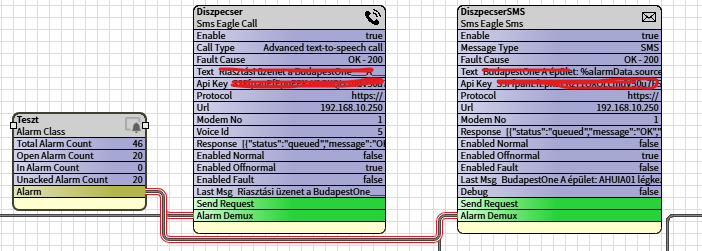
Example screenshot:

How to monitor Niagara4 (Supervisor)?

Niagara4 is a perfect monitoring tool, but what if its server hardware fails? Even the best hardware can experience failures. That’s where SMSEagle steps in with its feature called Network Monitoring. SMSEagle can monitor IP addresses or TCP ports and instantly send an SMS or make a call when a failure is detected. You may monitor:

  • Server reachability via Ping/ICMP
  • Web UI availability via HTTPS Check
  • CPU/RAM/Disk usage via SNMP

This ensures you can always keep an eye on your server hardware.

Explore SMSEagle Demo device

SMSEagle is a hardware & software solution that guarantees a swift delivery of your messages to designated recipients, whether it’s for notifications, alerts, or important updates.

After registering to a demo you get a remote access to our physical device NXS-9750.

  • 14-days free trial
  • Access to over 20 functionalities

What is hardware
SMS Gateway?

Learn more about
SMSEagle features