Bring your Active Directory contacts straight into SMSEagle
Keeping a separate contact list in sync with your company directory is tedious and error-prone. LDAP integration brings Active Directory or OpenLDAP into SMSEagle directly, so your phonebook is read live from the directory, or synced on a schedule you choose.
Connection details, directory structure, attributes, and security all live on one settings page, no jumping between menus to get directory sync working.
Know it works before you rely on it
Test the connection before contacts depend on it
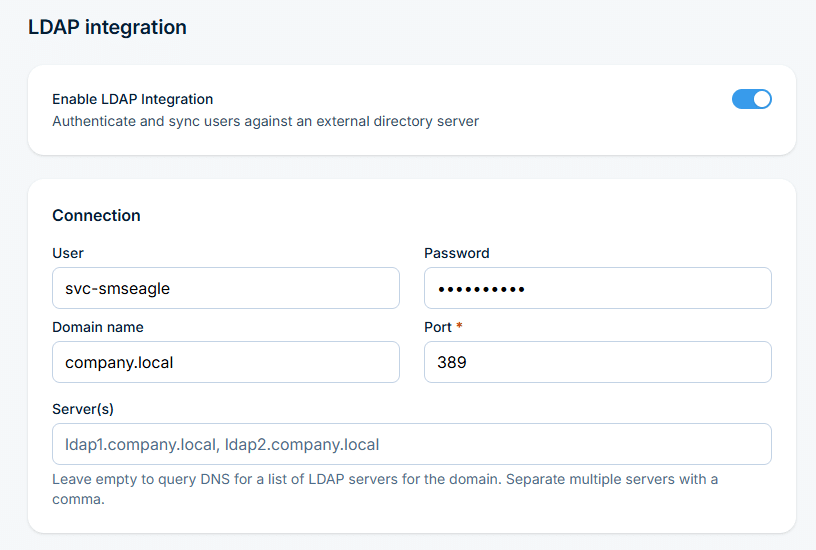
Fill in your AD or OpenLDAP server details, save your changes, then test the connection, so the connection is confirmed before anyone searches for a contact.
Switch on, save, test
Turn on the integration from one settings page
Turn on Enable LDAP Integration, fill in one settings page, save and test, and directory contacts and groups are ready to use across SMSEagle.
The right number, every time
The right number for every contact
Point SMSEagle at the correct Active Directory field so the number shown for every contact is always the right one, with security settings to match your environment.
Stop retyping numbers
Get directory contacts as suggestions in Compose
Once synced, Active Directory contacts and groups appear automatically while typing in Compose. You can also let people sign in to SMSEagle with their directory account.
SMSEagle combines hardware and software into a single, self-contained gateway. It is designed for critical environments, so security is built in from the ground up, confirmed by CE, FCC, ISED, UKCA, PTCRB, RCM, IMDA, TDRA, CB Scheme, GCF, carrier certifications (Verizon, AT&T) and ISO 27001.
SMSEagle connects to Active Directory or OpenLDAP, reads contacts and groups, and shows them as suggestions in Compose.
Can I log in to SMSEagle with my directory account?
Yes, optionally. Set up admin and user groups in your directory and enable LDAP authentication.
Where do LDAP contact suggestions appear?
In Compose, as you type a recipient’s name or number.
Which directory services are supported?
Active Directory and OpenLDAP. Contacts can be fetched live from the directory, or stored offline on the device so lookups keep working even if the directory is unreachable.
Which SMSEagle devices support LDAP?
LDAP is a built-in feature available on all current SMSEagle hardware SMS gateways.