

Webinar Recording & Key Takeaways: From Passive Monitoring to Reliable Alerting with Niagara4

What happens when your system detects a critical issue — and no one reacts? This was the main question discussed during our recent webinar with Krucsó László, Technical Leader at SmartNode, and Andrzej Kubala, Head of Sales at SMSEagle. Together, they explored a real-world example showing why detecting a problem is only half the battle — the other half is ensuring someone actually takes action.

Missed the live session? You can watch the webinar recording here:

Monitoring works. Notification often doesn't.

As Krucsó László explained, many Niagara4 deployments already provide excellent visibility. Operators can see alarms, trends, events, and system status on dashboards. The challenge begins when a critical alarm appears outside working hours and nobody is looking at the screen.

This is the difference between:

  • Passive alerting — information exists in a dashboard, alarm console, or inbox and depends on someone checking it.
  • Active alerting — the system actively reaches the responsible person through a channel that is hard to ignore and continues until someone acknowledges the alert.

One of the most memorable messages from the webinar was: 

"A dashboard is not an alarm. It's only a source of information. A real alarm reaches the right person at the right time and triggers action."

Case study: When a burst pipe becomes
a major disaster

The webinar featured a real case from a healthcare facility in Hungary.

    • The facility did not have 24/7 on-site staff.
    • One Friday night, a pipe burst.
    • The Building Management System detected the issue, but no one reacted.
    • By the time personnel became aware of the problem, significant damage had already occurred.
    • The incident affected building infrastructure and created a serious operational risk.

The lesson was simple:

"The failure wasn't detection. The failure was notification."

Cartoon man with a leg cast sitting on a chair, using a tablet beside a large office building and a calendar.

How the problem was solved

To address the issue, the facility implemented an autonomous emergency notification layer based on SMSEagle hardware.

The deployment included:

    • dedicated monitoring for water leakage and power failure events,
    • SMS notifications,
    • voice call alerts,
    • an external 4G antenna,
    • UPS-backed operation,
    • alert delivery independent of the Building Management System.

As a result, critical events no longer remained visible only within the technical system. Instead, alerts actively reached responsible personnel through SMS and voice calls via the SMSEagle gateway.

Niagara4 integration in action

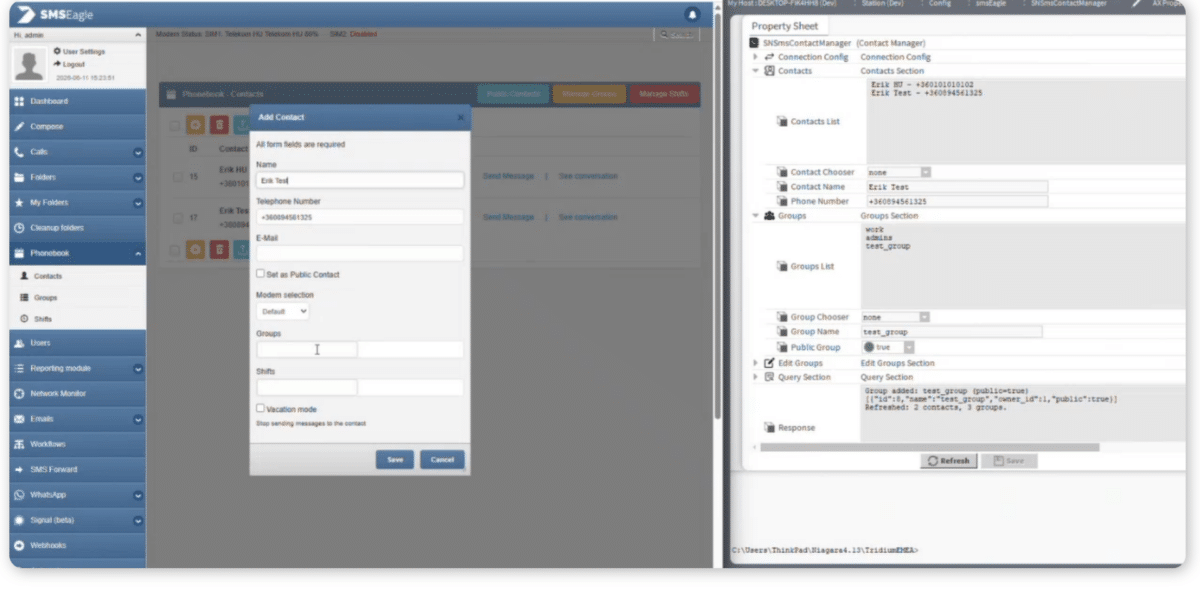
The webinar also included a live demonstration of SmartNode’s native Niagara4 integration for SMSEagle. Krucsó László showed how the module enables users to configure alerting, acknowledgements, contacts, groups, SMS messaging, voice calls, WhatsApp notifications, and I/O management directly from Niagara.

The integration also supports:

    • alarm acknowledgements through SMS,
    • user and group management,
    • contact synchronization,
    • WhatsApp-based acknowledgements,
    • monitoring of SMSEagle I/O and temperature sensors.
CRM-like UI: left blue navigation rail, center 'Add Contact' modal with fields for Name, Telephone, Email, and a right-hand properties panel visible.

Why SMS and voice calls still matter

A major part of the discussion focused on alert deliverability.

Andrzej Kubala explained that critical alerts should not rely solely on traditional channels such as email. Messages can be overlooked, buried in inboxes, or missed during the night. SMSEagle was designed to provide an independent communication path through cellular networks using a physical appliance with its own SIM card.

The webinar demonstrated how organizations can combine:

    • SMS,
    • voice calls,
    • WhatsApp,
    • Signal,
    • email,

within a single alerting workflow.

Making sure someone responds

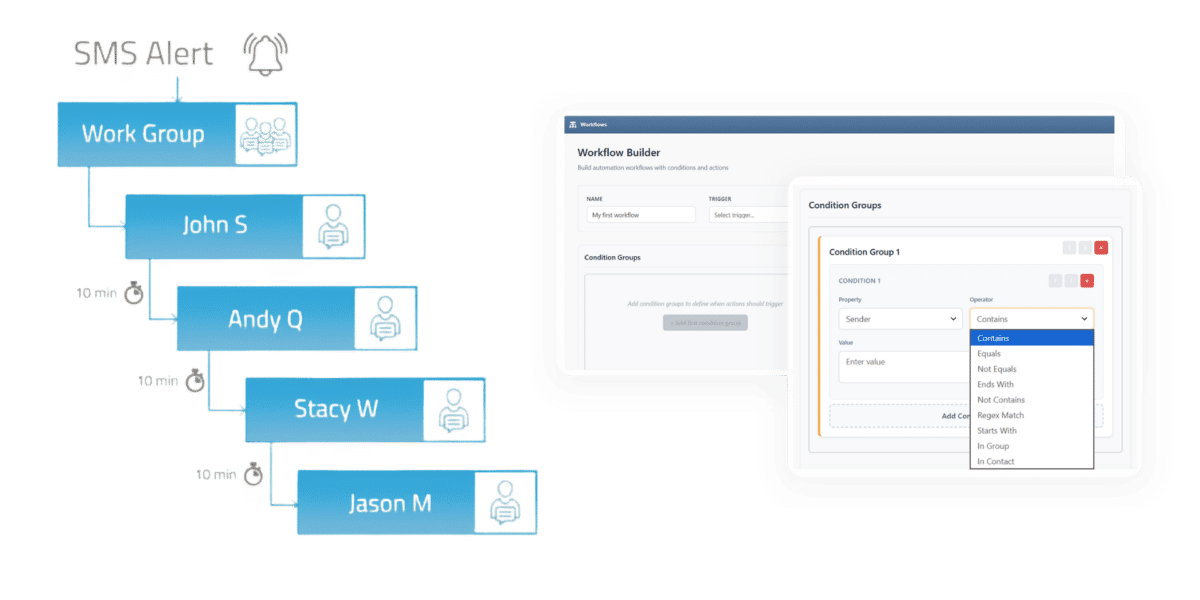
The presenters showed how alert workflows can automatically escalate notifications if the first recipient does not respond. Messages can be forwarded to additional team members until someone acknowledges the alert. SMSEagle also supports scheduling and shift-based routing to ensure notifications are always delivered to the person currently on duty.
 

The takeaway was clear: 

"Alerting should be designed around response, not delivery."

Flowchart of an SMS alert workflow for a work group, listing John S, Andy Q, Stacy W, Jason M with 10-minute steps.

Key webinar takeaways

If there’s one lesson to remember from this webinar, it’s this:

"Having alarms is not enough."

A critical event can still become a costly incident if the notification never reaches the right person — or if nobody reacts. Both presenters emphasized that reliable alerting should be treated as part of the system design, not as an optional add-on after something goes wrong.

Before implementing a notification strategy, they recommend:

    • defining which alarms are truly critical,
    • identifying responsible users and groups,
    • configuring escalation paths,
    • ensuring alerts can be delivered outside normal infrastructure channels.

"Because the cost of a missed critical event can easily exceed the cost of implementing a reliable alerting system."

Software Updates

Hero image promoting a webinar recording: overlapping slides with a blue slide reading 'Dashboard ≠ Alert' and a prominent 'Watch the webinar recording >' CTA on a light blue background.

Webinar Recording & Key Takeaways: From Passive Monitoring to Reliable Alerting with Niagara4

What happens when your system detects a critical issue — and no one reacts? This was the main question discussed during our recent webinar with Krucsó László, Technical Leader at SmartNode, and Andrzej Kubala, Head of Sales at SMSEagle. Together, they explored a real-world example showing why detecting a problem is only half the battle — the other half is ensuring someone actually takes action.

Read More »