SMS server: what it takes to build one, and when to buy instead
If you are looking for an SMS server, you are usually one of two people: someone who wants to run the software themselves, or someone
If you are looking for an SMS server, you are usually one of two people: someone who wants to run the software themselves, or someone who wants the whole thing to simply work. This article is about the difference between the two, and about the costs that only show up after you have started.
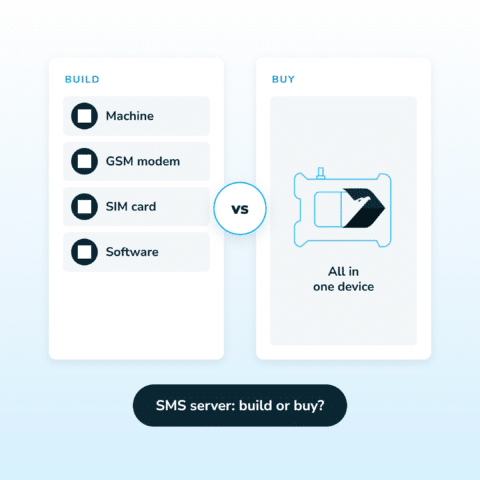
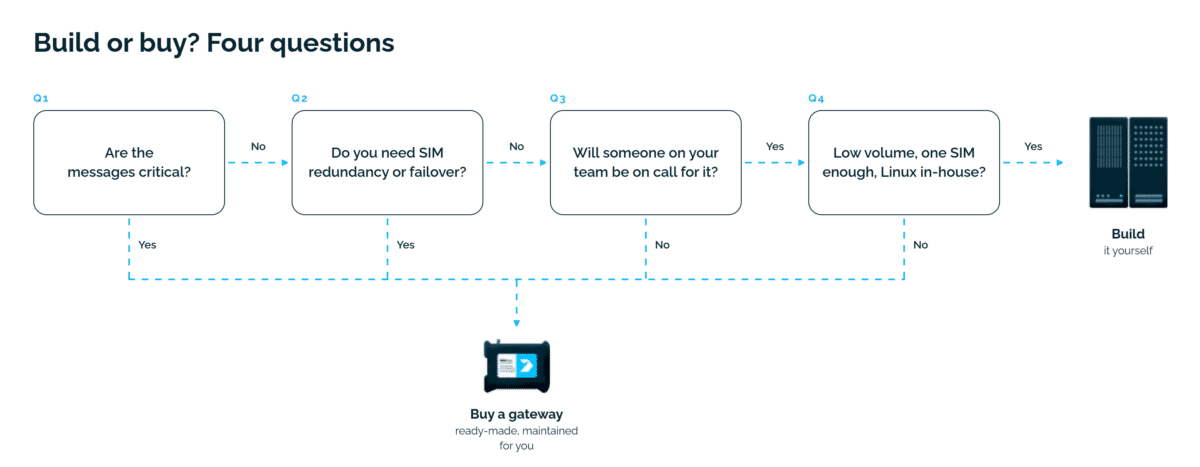
Build your own SMS server when volume is low, one SIM is enough, and you already run Linux machines in-house. Buy a ready-made gateway when the messages are critical, you need SIM redundancy or failover, and nobody on the team wants to be on call for the messaging layer itself. Both options are on-premise and both keep your data in your own network. The difference is who assembles the parts and who is responsible when one of them stops working.
For a wider look at hardware and online (cloud) gateways, see our hardware vs online SMS gateway comparison.
| Self-built SMS server | Hardware SMS gateway | |
|---|---|---|
| Up-front cost | low, often reuses existing hardware | one-time purchase of the device |
| Ongoing cost | your team's time | SMS cost from your operator |
| Who maintains it | you | the manufacturer, through updates |
| Data stays in your network | yes | yes |
| SIM redundancy and failover | possible, you build it | built in on multi-modem models |
| Throughput | depends on modems you add and manage | 30 to 240 SMS/min depending on model |
| Support when it breaks | community and your own team | vendor support with response times |
| Ready-made integrations | you write them | over 100 systems supported out of the box |
| Time to first message | days to weeks | hours |
You will see the same thing called an SMS server, an SMS gateway server or an SMS messaging server. The names are used interchangeably and they all describe the same three parts:
This is true whether you assemble it yourself or buy a hardware gateway. In a hardware gateway the three parts sit in one enclosure, already assembled, with the operating system and the modem firmware maintained by the manufacturer. Nothing magic happens in either case: the question is only who does the assembling and the maintaining.
Here are 3 popular uses:
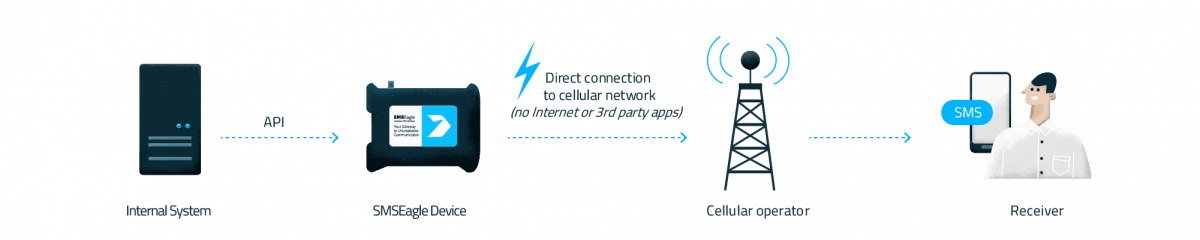
A monitoring platform detects a failure and the server sends SMS alerts and notifications to the on-call engineer’s mobile device. SMSEagle can also watch devices itself over ICMP ping, TCP and UDP ports, SNMP and Modbus TCP, and send an SMS, or a voice call with the optional voice add-on, when a device or service stops responding.
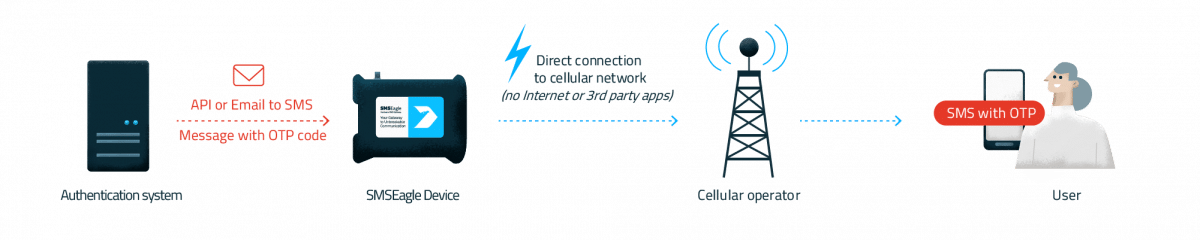
Authentication systems use SMS text messages to deliver one-time codes to users. The device supports multi-factor authentication by SMS or authenticator app for its own users, and there are ready-made integrations for authentication platforms such as Okta, Keycloak and Cisco ISE.
Business applications and CRM systems send SMS notifications and reminders as text messages to a customer’s or an employee’s phone number, either through the API or, where the software cannot be changed, by email. Messages can be scheduled and built from message templates. For bulk messaging, recipients can be imported from a CSV file and each message personalized with variables such as the recipient’s name.
The shopping list is shorter than the commitment. The SMS gateway server hardware you need comes down to four things:
A small server, a spare PC or a single-board computer will all do the job technically. It has to survive reboots, power events and the person who set it up changing jobs.
A USB dongle is the cheapest entry point, an industrial modem is the one that survives years of continuous duty. One modem handles one channel, so throughput scales with how many you are willing to plug in and manage.
Consumer tariffs often throttle or block bulk sending, and finding that out in production is unpleasant.
You need the software itself, plus whatever glue your own systems need to talk to it.
And the part that rarely makes it into the estimate: somebody has to keep it running. Operating system updates, modem drivers that change behaviour between kernel versions, certificate renewals, disk filling up with logs, and monitoring for the monitoring system itself. If the SMS server is what tells you the network is down, then it going down quietly is the worst failure mode you can have.
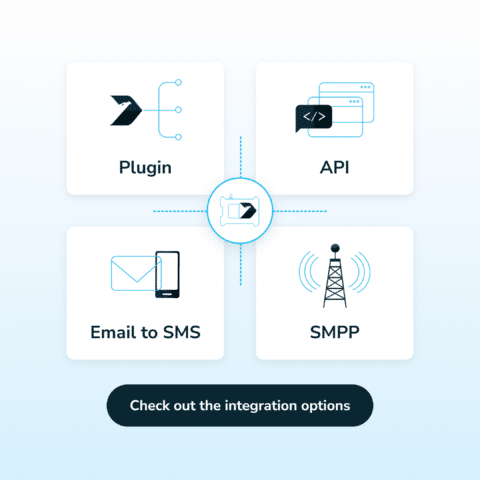
Once the server is running, your own systems have to reach it. In practice there are four ways in, and a working deployment usually uses more than one:
The common case: your monitoring system, CRM or application calls the server’s SMS API over the local network to send SMS. Ours ships with a documented REST API and an older JSON-RPC one for existing integrations. The SMS gateway API v2 is RESTful, described by an OpenAPI 3.0 specification, with token authentication and access control per resource. The older v1, based on HTTP and JSON-RPC, remains for existing projects. Your own applications, scripts and monitoring tools can use it: anything that can make an HTTP request can send messages. Full API documentation is in the manuals on the downloads page.
Anything that can send an email can send a message, which is often the fastest way to connect legacy software you cannot modify. Messages can be routed to contacts and LDAP groups, and Office 365 is supported through OAuth2. See the Email to SMS feature.
The server translates your message into the telecommunication protocols carriers speak, and SMPP is the one that matters when you integrate with telecom systems rather than business applications. SMSEagle includes an SMPP server for this kind of integration.
Monitoring tools, CRM systems and ticketing platforms usually have a connector already, so nobody writes code for a standard case. The full list is on the integration plugins page.
The traffic goes both ways. The server does not only send messages, it can also receive messages and SMS sent to the phone number of its SIM card. Incoming SMS messages arrive in an inbox, from where they can be forwarded by email, matched against rules, answered automatically or passed to a workflow that triggers the next action in your systems. Delivery reports come back from the carrier networks and are kept with the sent items, so you can confirm message delivery and tell a message you queued from a message that actually arrived. If you build the server yourself, every one of these paths is something you implement and maintain.
An open source SMS gateway is a realistic option. The software is mature, well documented and genuinely free to download, and for a certain shape of deployment it is the right answer. We would rather say that plainly than pretend otherwise.
It is usually enough when:
It stops being enough when you need any of this:
The honest arithmetic: free software is not free labour. Before choosing, put a number on the hours your team will spend building, maintaining and being on call for it, then compare that with the one-time cost of hardware. Our affordability calculator does the second half of that sum for you. Sometimes self-hosting still wins. Sometimes the number is uncomfortable.
A hardware SMS gateway is not an alternative to a server. It is a server: a Linux machine with modems, SIM slots, a web interface and an API, assembled, hardened and updated by us instead of by you.
That is the whole proposition. You keep what people actually want from self-hosting, which is that messages leave from inside your own network and the data never touches a third party. You hand over the part nobody enjoys, which is maintaining it. Our devices run the same software platform across all three models, with free updates during the warranty period, and the setup comes down to racking the unit and putting a SIM in it.
User roles, multi-factor authentication, LDAP or Active Directory integration, allow and deny lists and SSL certificate management are configured on the device, inside your perimeter. That matters because of what these servers are typically used for: two-factor authentication codes, security alerts from monitoring systems, and emergency alerts that have to go out while something else is on fire. Those are exactly the messages you do not want routed through somebody else’s platform.
For high volume messaging the same logic applies, only with more modems: our eight-modem model sends up to 240 SMS per minute, with the queue carried over automatically if one modem loses its connection to the carrier. The dual-modem model sits in between, at up to 60 SMS per minute, so match the model to the message volume you expect at peak. On multi-modem models the device checks every modem every three minutes and passes the work of a disconnected one to another. This needs at least two active SIM cards, and because the check is periodic, it is not an instant switch. More in the modem failover feature.
The same device also handles MMS, Flash SMS and USSD codes. It can exchange messages over WhatsApp, with fallback to SMS or MMS, over Signal on Rev.4 and newer devices, and over MQTT for IoT and automation systems. Voice calls, including text-to-speech, are available with the optional voice add-on.
If that is the direction you are leaning, the on-premise SMS gateway page covers how it works in your network in more detail.
Whichever route you take, the server becomes part of your alerting chain, so you need to see what it is doing and know who to call when it misbehaves.
A gateway should be able to tell you about itself. SMSEagle shows the device type, firmware version, IMEI and signal strength on a system information page, and keeps logs that can be downloaded in full for diagnostics. Status LEDs show power and whether each SIM is still searching for the network or already connected.
SMSEagle support answers by email and phone, and the support portal holds manuals and a knowledge base. The support team helps with installation, integration and troubleshooting. For a self-built server, all of that is your own work.
Technically yes, and for testing it is a reasonable way to start. For anything you depend on, the limiting factor is not the computer but everything around it: uninterrupted power, a modem rated for continuous duty, and somebody responsible for keeping the machine patched.
If you use an online API, you no longer have an SMS server: you have a client talking to somebody else’s cloud, and your messages depend on your internet connection and on their uptime. A modem with a SIM card is what makes the setup independent of both.
The licence is. The deployment is not. Budget for the hardware, the modems, the SIM tariff and, above all, the hours spent on setup, updates and being on call.
Roughly one modem’s worth per modem, so throughput grows with every modem you add and manage. For reference, our single-modem device sends up to 30 SMS per minute and the eight-modem model up to 240, which gives you a sense of the hardware needed for a given rate.
Both routes keep your messages inside your own infrastructure, which is usually the reason people start looking for an SMS server in the first place. Choose the self-built route when the work of maintaining it is work you were going to do anyway. Choose a ready-made gateway when you want the same independence without owning the maintenance.
If you want to see the second option running before deciding, we offer a free 14-day trial on a live demo device, with no credit card required.
SMSEagle is a hardware & software solution that guarantees a swift delivery of your messages to designated recipients, whether it’s for notifications, alerts, or important updates.

If you are looking for an SMS server, you are usually one of two people: someone who wants to run the software themselves, or someone

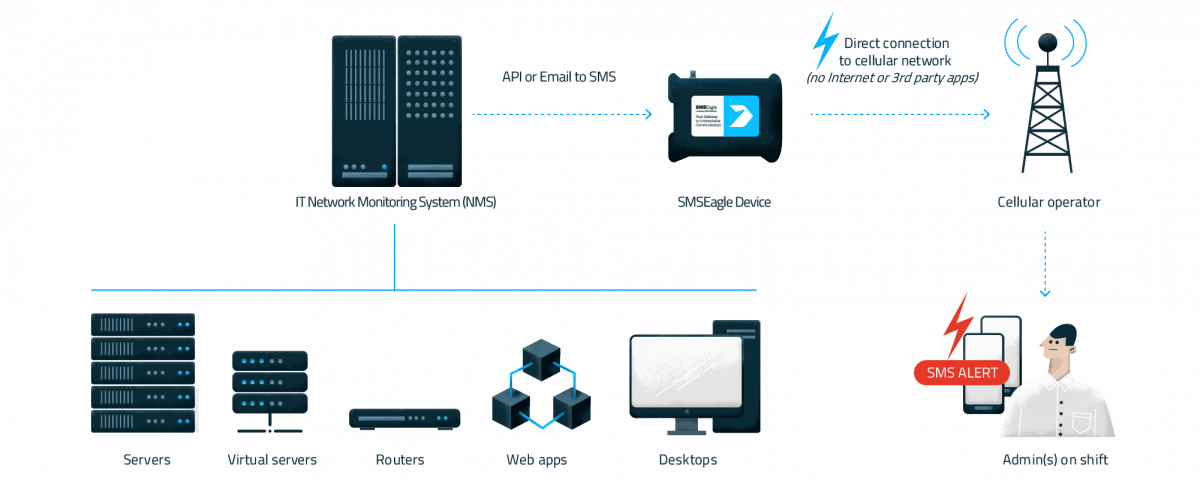
Integrating an SMS gateway means connecting your software to it, so the software can send text messages and receive replies automatically. There are four main ways to do it: a ready-made plugin, an API, Email to SMS and SMPP.
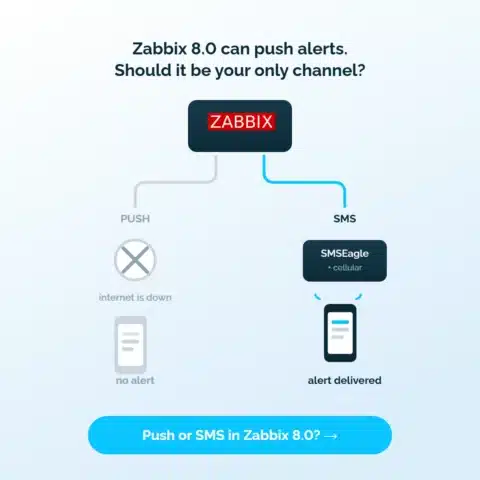
Zabbix 8.0 adds push notifications and a mobile app. Here is what the architecture depends on, where it breaks, and why SMS and voice alerts still belong in your escalation chain.

Engineer by education, marketer by choice. For 6+ years I've combined technology, data, and content marketing to help companies gain a competitive advantage and achieve measurable results. As a Technical Content Specialist at SMSEagle, I develop brand messaging and content that support sales, customer education, and market positioning. A degree in Information Systems gave me a unique perspective at the intersection of business and technology. I believe quality is the only thing worth scaling.