Zabbix 8.0 LTS brings something administrators have asked about for years: an official Zabbix mobile app, with push notifications delivered straight to the phone. No email relay, no custom script, no gateway in between.
It is a genuinely useful addition. It also raises an obvious question, and we would rather answer it openly than pretend nobody asked:
If Zabbix can push alerts to my phone by itself, do I still need an SMS gateway?
The honest answer is that push and SMS fail in completely different ways, and the entire point of an alerting chain is that its layers do not fail together. Below is what the push architecture actually looks like according to Zabbix’s own documentation, which dependencies it adds, and where SMS and voice calls still do something push structurally cannot.
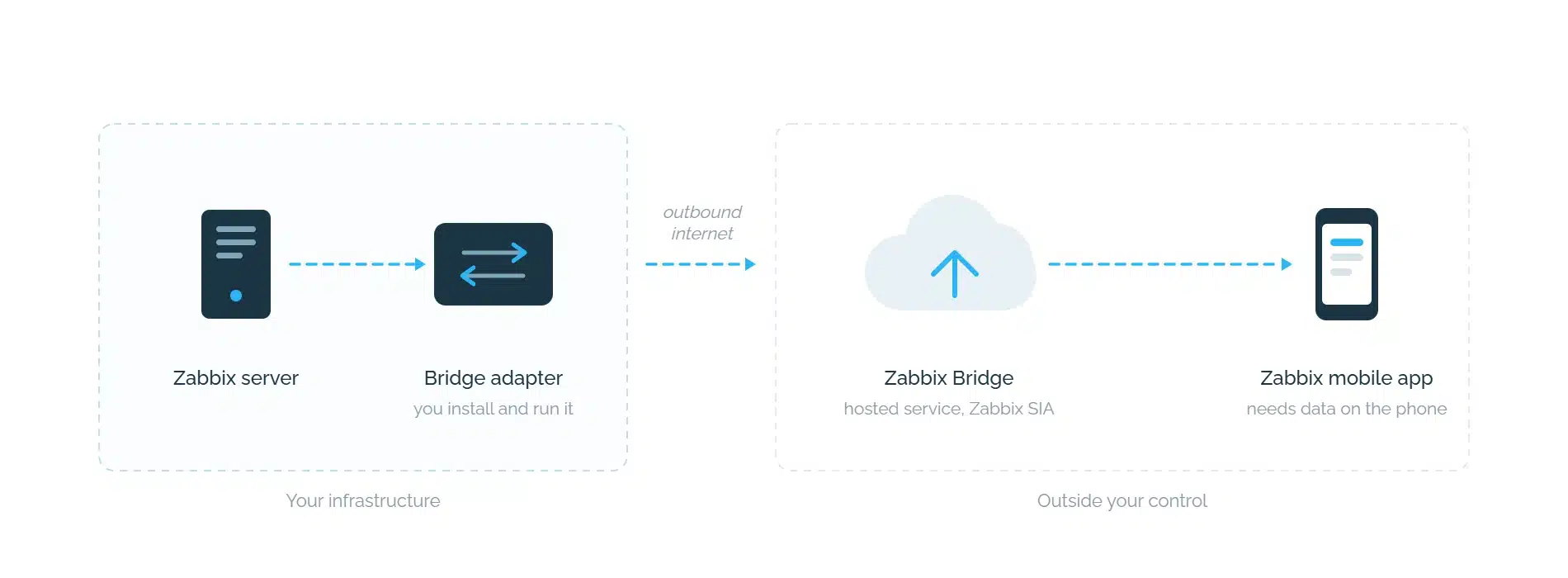
The app, the adapter and the central Bridge are not open-source Zabbix. They are separate components under their own licence terms, not part of the Zabbix server package you already run. If your procurement or compliance process treats “open source, self-hosted” as a given for your monitoring stack, push is a new question for it, not a new feature inside an answered one.
Zabbix server high availability does not extend to the bridge adapter. Running Zabbix in an HA cluster does not make the adapter highly available. Each node needs its own reachable adapter endpoint, and the adapter’s availability, recovery and enrollment state have to be planned separately. The adapter is a new component in the alerting path that your existing HA design does not cover.
The adapter sees the alert text. The Zabbix server hands the adapter the notification title, body and event metadata. Device payload encryption and TLS between components are separate protection layers, which is a useful distinction when deciding what may appear in a notification at all.
A note on timing: at the time of writing, the official Zabbix mobile app is described in the 8.0 documentation as coming soon. If you are planning your alerting around the 8.0 upgrade window, that is worth knowing before you build a rota on a channel that has not shipped yet.
Every delivery channel has a list of things that must be working for the message to arrive. For email, everyone knows the list by heart. For push it is longer than it first appears:
| Must be working | Push notification | SMS or voice call from a local gateway |
|---|---|---|
| On your side | ||
| Zabbix server | ✓ | ✓ |
| Bridge adapteran extra component you install and maintain | ✓ | – |
| Outbound internet from your network | ✓ | – |
| Zabbix Bridgea third-party hosted service | ✓ | – |
| On the recipient’s side | ||
| Mobile data or Wi-Fi on the phone | ✓ | – |
| An app installed, logged in, notifications allowed | ✓ | – |
| Cellular coverage and an active SIM | – | ✓ |
| Things that must work | 6 | 2 |
Neither column is better. They are different lists, and that is the whole point.
An alert sent over the path in the right-hand column does not care whether the path in the left-hand column is up. That is the only reason to keep both configured.
1. The internet link itself is the incident. Your upstream provider drops, a border router dies, a firewall change cuts outbound traffic. Zabbix sees it instantly and fires the action. The push alert then needs that same internet connection to leave your network, reach Zabbix Bridge and come back down to the phone. The alert about the outage is trapped behind the outage. Mobile data on the engineer’s phone does not help, because the break is on the sending side. An SMS from a gateway in your rack leaves over the cellular network instead, independently of your WAN.
2. The on-call engineer has coverage but no data. A basement data centre, a lift, a plant floor, a train in a tunnel, roaming with data switched off. A voice call and an SMS get through on one bar of signal. A push notification waits in a queue until the phone finds a usable data connection.
3. The notification arrived and nobody woke up. The quiet one. Push notifications are subject to battery optimisation, Do Not Disturb, focus modes and per-app notification settings. A ringing phone behaves differently from a banner, by design. At 3 a.m. on a severity-one event, that difference is the entire value of the channel.
There is also a governance question that comes up in regulated environments and in the public sector. Push means problem data and metadata travel through an external hosted service. For most organisations that is perfectly normal. For some it is a non-starter, and for those the architecture answers the question before the feature comparison starts.
We are a gateway vendor, so our reading of this is not neutral. Here is an independent one.
Tomáš Heřmánek of initMAX, a Zabbix Premium Partner, covered the push architecture in detail in their Zabbix 8.0 write-up, including a section on what it means for alerting. On the limits of push as a channel for reporting connectivity failures, he writes that “push is not an independent channel for reporting Internet connection failures”, and on the on-premises question, that “a local adapter alone therefore does not make the solution fully on-premises”.
His conclusion on the alternative path is worth reading in full in the original article, including the caveats he puts on it: a gateway needs power, coverage, an active SIM and a working local connection to Zabbix, and it cannot compensate for the Zabbix server or the whole LAN being down. SMS is also not end-to-end encrypted, so notification text should carry only what it has to.
That is the right way to frame it. No channel is unconditional. The question is whether your channels fail for the same reason at the same time.
Zabbix has always supported SMS, and it is worth being precise about what that support is. The built-in SMS media type drives a serial GSM modem attached to the Zabbix server’s serial port. The documentation lists two tested modems, Siemens MC35 and Teltonika ModemCOM/G10, and notes one limitation that matters at scale: parallel processing of SMS notifications is not possible.
In practice, messages leave one after another from a single modem on a single server. For a handful of alerts that is fine. For an event storm, a long on-call list, or a server you would rather not tie to a physical serial cable, it becomes the bottleneck exactly when throughput matters most.
A network-attached hardware gateway removes both constraints. It is reachable over the API from anywhere in your infrastructure, it is not bound to one host, it can hold several modems, and it survives a restart or migration of the Zabbix server.
Not “push or SMS”. Layers, ordered by how much each one depends on.
Layer 1, push and email. Rich context, two-way actions, no per-message cost. The right default for most problems, where the engineer is at a desk and the network is healthy.
Layer 2, SMS. The floor under layer 1. Nothing required but cellular coverage. The right channel for severity-one events and for the escalation step after an unacknowledged push.
Layer 3, voice call. For events where someone has to wake up. A ringing phone defeats Do Not Disturb in a way no banner does.
Zabbix lets you wire this up with no custom logic, using escalation steps in the action configuration. Push is simply another escalation step. A practical pattern:
The alert escalates by itself, and each step depends on less infrastructure than the one before it. That ordering is the design principle. Your last resort should be the channel with the shortest dependency list, not the longest.
One more argument for keeping SMS configured: the alert you need most is the one saying that Zabbix itself, or the network it runs on, is in trouble. That is precisely the alert a push chain cannot be relied upon to deliver.
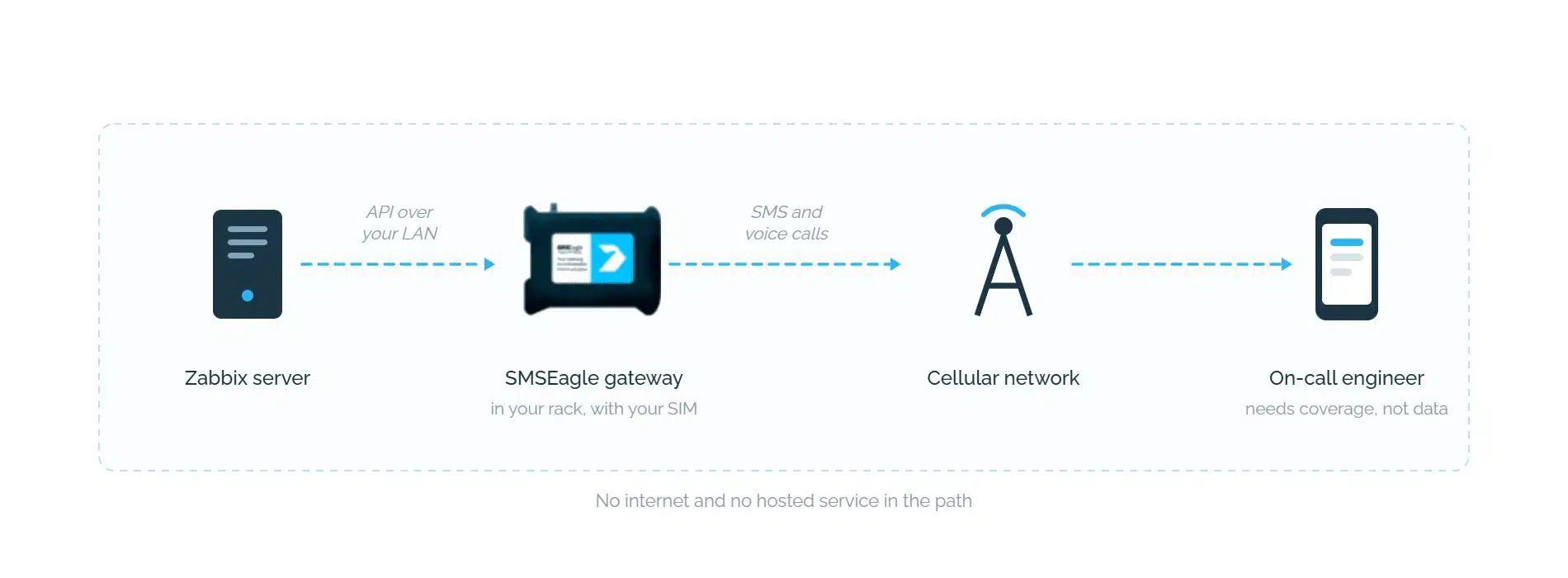
SMSEagle is a hardware SMS gateway that sits in your rack and sends over the cellular network, with no cloud service in the delivery path and no per-message fee. The Zabbix integration is a native media type: import one media type file, point it at the device, and SMS, MMS and text-to-speech voice calls become available as Zabbix media in the same escalation chain as push and email. It works on current Zabbix versions, 8.0 included.
If you want the longer argument about external services in an alerting path, we made it separately in Online vs. Offline SMS Gateway.
Does Zabbix 8.0 push notification replace an SMS gateway?
No. Push depends on outbound internet from your network, on the Zabbix Bridge hosted service, and on a data connection on the recipient’s phone. SMS depends on cellular coverage only. They are complementary layers in an escalation chain, not alternatives.
Does the Zabbix mobile app connect directly to my Zabbix server?
No. According to the Zabbix documentation, the app communicates with Zabbix Bridge, a centrally hosted service, which passes requests to a bridge adapter you install and run yourself. The adapter talks to your local Zabbix API.
Is push notification part of open-source Zabbix?
The media type and device management are in the server and frontend, but the mobile app, the bridge adapter and the central Zabbix Bridge service are separate components with their own licence terms, not part of the open-source Zabbix server package.
Does Zabbix server HA cover the bridge adapter?
No. Running Zabbix in an HA cluster does not make the bridge adapter highly available. Each server node needs a configured, reachable adapter, and adapter availability has to be planned separately.
What do I need to install for push notifications to work?
The Zabbix bridge adapter, on the Zabbix server or a separate system, plus the BridgeAdapterURL and EnableMobileDevices server parameters and a Push media type. Without a configured, reachable adapter, device linking and push delivery cannot complete.
Can I use push and SMS at the same time?
Yes, and that is the recommended setup. Configure them as separate media types and order them as escalation steps in the action, so an unacknowledged push escalates to SMS and then to a voice call.
Is the built-in SMS media type enough?
It drives a serial GSM modem attached to the Zabbix server and does not send notifications in parallel. Workable for small installations, a bottleneck during an event storm or with a long on-call list. A network-attached gateway removes both constraints.
Does the SMSEagle integration work on Zabbix 8.0?
Yes. Details and setup instructions are on the integration page.

Engineer by education, marketer by choice. For 6+ years I've combined technology, data, and content marketing to help companies gain a competitive advantage and achieve measurable results. As a Technical Content Specialist at SMSEagle, I develop brand messaging and content that support sales, customer education, and market positioning. A degree in Information Systems gave me a unique perspective at the intersection of business and technology. I believe quality is the only thing worth scaling.