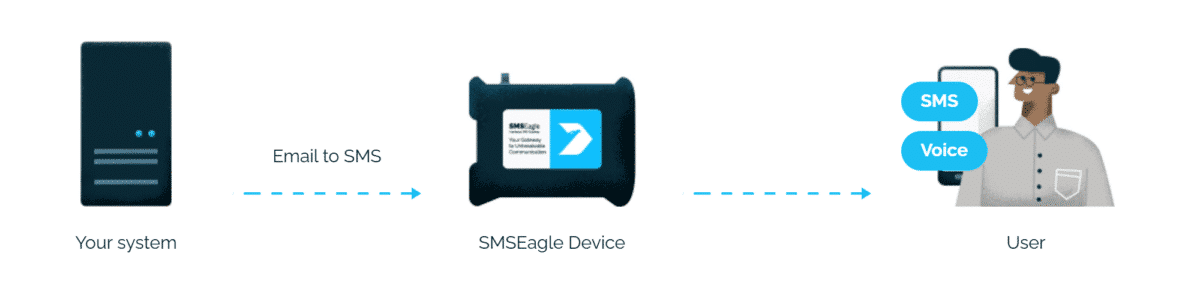
Integrating Vertiv Geist Watchdog environmental monitors with the SMSEagle hardware SMS gateway lets you deliver server room alarms as SMS messages, wake-up ring calls and text-to-speech voice calls (TTS Advanced). The result is an out-of-band notification channel that works even when your mail server or internet link is down, which is exactly when a server room needs attention.
A temperature spike, a water leak or an open rack door reaches the on-call engineer by SMS or voice call. SMSEagle delivers the message directly over the cellular network, without relying on an external mail relay or a cloud SMS provider.
Faster incident response
Nobody has to watch the Watchdog web interface or an inbox. A TTS Advanced call wakes the technician at night and reads out the alarm, for example which sensor tripped and the current value.
No auto-dialer, no extra hardware
The integration uses the email alerting that every Watchdog 15 and Watchdog 100 already has. There is no need for a separate auto-dialer, a modem attached to the monitor or an email-to-SMS subscription.
Communication you control
SMSEagle runs inside your own network. Alarm content, phone numbers and sensor data never leave your infrastructure, which simplifies compliance with NIS2, ISO 27001 and internal security policies.
How it works?
1
Event Trigger
The Watchdog detects a threshold breach on a sensor, for example inlet temperature, humidity, dew point or a leak detector.
2
Communication
The Watchdog sends an alarm email to PHONE_NUMBER@SMSEAGLE_IP or PHONEBOOK_GROUP@SMSEAGLE_IP. SMSEagle acts as the SMTP server, so no external mail server is involved.
3
Alert
SMSEagle converts the email into an SMS and, optionally, follows it with a wake-up call or a TTS voice call.
How to set up the integration
Requirements
Item
Requirement
Watchdog model
Vertiv Geist Watchdog 15, 15-P, 100 or 100-P
SMSEagle device
latest software version recommended
SMSEagle plugin
Email to SMS (included in every device)
Voice features
VOICE add-on for the SMSEagle device
Network
access from the Watchdog to SMSEagle on TCP port 25
SMSEagle setup
In the SMSEagle web GUI open Settings > Email > Email to SMS and enable the feature.
Open Automation > Email to SMS and create a new rule. You can accept all emails or only emails from the Watchdog IP address or sender domain.
Optional, for voice alerting: edit the rule and set Call after sending SMS to one of: Ring only; Yes – text to speech (advanced).
Watchdog setup
Log in to the Watchdog web interface as Administrator.
Open the Email configuration page.
Set SMTP Server to the IP address of SMSEagle and Port to 25.
Disable SSL. The Watchdog supports only fully encrypted TLS/SSL sessions and not StartTLS, so an unencrypted local connection on port 25 is the simplest setup.
Enter a From address, for example watchdog-dc1@company.local. Leave username and password empty.
In the Target Email Address fields enter recipients in the format PHONE_NUMBER@SMSEAGLE_IP, for example 48501234567@192.168.1.101. You can also use a public Phonebook group defined in SMSEagle’s Phonebook: PHONEBOOK_GROUP@SMSEAGLE_IP, for example oncall@192.168.1.101 to notify a whole team.
Save and click Send test email.
Open the sensor alarm settings, define the threshold (for example Temperature above 27°C) and select the email recipients as the alarm action.
Test and verify
Send a test email from the Watchdog Email page and check that it arrives as an SMS.
Set a temporary low temperature threshold to trip a real alarm.
Confirm that both the alarm and the Cleared message arrive. The Watchdog sends a notification when the condition returns to normal.
In SMSEagle check Sent messages and, for voice, Calls > Call history.
Troubleshooting
Symptom
Cause
Email Status shows an error on the Watchdog
wrong SMSEagle IP, port 25 blocked by a firewall, or SSL still enabled
Email accepted, no SMS sent
no matching forwarding rule in Email to SMS, or wrong phone number format in the address
SMS arrives, no call
VOICE add-on missing or Call after sending SMS not set in the rule
No Cleared message
alarm action not assigned to the clear event on the sensor
Alternative: SNMP polling from SMSEagle
Every Watchdog exposes sensor values over SNMP v1/v2c (v3 on newer firmware). SMSEagle Network Monitor can poll the Watchdog directly and raise an SMS or call when a value goes out of range. This keeps working even if email alerting on the Watchdog is misconfigured.
How to monitor the Watchdog itself?
A Watchdog that loses power or network access cannot send any alarm. SMSEagle Network Monitor can check the Watchdog with Ping/ICMP and an HTTP check of its web interface. If the unit stops responding, SMSEagle sends an SMS or places a call on its own. This ensures you can always keep an eye on your Watchdog hardware.
Explore SMSEagle Demo device
SMSEagle is a hardware & software solution that guarantees a swift delivery of your messages to designated recipients, whether it’s for notifications, alerts, or important updates.
After registering to a demo you get a remote access to our physical device NXS-9750.