Home / Integration plugins / SMS & voice alerts for Raritan PX PDUs and SmartSensors

+

SMS & voice alerts for Raritan PX PDUs and SmartSensors

Integrating Raritan PX intelligent rack PDUs, EMX rack controllers and SmartSensor environmental sensors with the SMSEagle hardware SMS gateway lets you deliver power and environmental alarms as SMS messages, wake-up ring calls and text-to-speech voice calls (TTS Advanced). The same setup works for Server Technology PDUs running Xerus firmware. Alarms travel out-of-band, independent of your mail server and internet link.

Signal message icon

Alerts that get through

A tripped circuit breaker, an overloaded inlet or a hot spot at the top of the rack reaches the on-call engineer by SMS or voice call. SMSEagle delivers it directly over the cellular network, even when the corporate mail system is unavailable.

Long product lifespan icon

Faster incident response

The alarm arrives on the phone with the PDU name, sensor and reading, so the engineer knows which rack is affected before opening Power IQ or the PDU web interface. A TTS Advanced call reads the alarm out loud at night.

Customization options icon

One gateway for the whole data hall

Xerus PDUs can send SMS only through a cellular USB modem plugged into each unit. With SMSEagle, every PDU keeps using its standard email action, and one central gateway handles SMS and voice for hundreds of PDUs.

Verified security badge: blue shield outline with a dark circle and white checkmark indicating protection and trust.

Communication you control

SMSEagle runs on-premise in the management network. Alarm content, phone numbers and power data stay in your infrastructure, which supports colocation SLAs, NIS2 and ISO 27001 requirements.

How it works?

1

Event Trigger

The PDU event engine detects a condition, for example a SmartSensor temperature above the upper critical threshold or a circuit breaker trip.

2

Communication

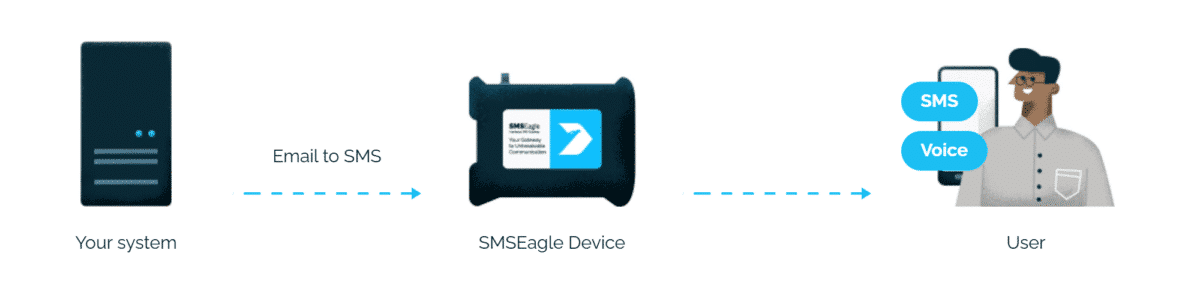
An event rule runs a Send email action to PHONE_NUMBER@SMSEAGLE_IP or PHONEBOOK_GROUP@SMSEAGLE_IP. SMSEagle acts as the SMTP server.

3

Alert

SMSEagle converts the email into an SMS and, optionally, follows it with a wake-up call or a TTS voice call.

How to set up the integration

Requirements

ItemRequirement
PDURaritan PX2/PX3/PX4, EMX, PX inline meters, or Server Technology PDU with Xerus firmware
SensorsRaritan SmartSensors (DX2, DX, DPX3) connected to the PDU sensor port
SMSEagle devicelatest software version recommended
SMSEagle pluginEmail to SMS (included in every device)
Voice featuresVOICE add-on for the SMSEagle device
Networkaccess from the PDU management port to SMSEagle on TCP port 25

SMSEagle Setup

  1. In the SMSEagle web GUI open Settings > Email > Email to SMS and enable the feature.
  2. Open Automation > Email to SMS and create a new rule. You can accept all emails or only emails from the specified address or sender domain.
  3. Optional, for voice alerting: edit the rule and set Call after sending SMS to one of: Ring only; Yes – text to speech (advanced).

PDU Setup

  1. Log in to the PDU web interface as administrator.
  2. Open Device Settings > SMTP Server. Enter the SMSEagle IP address, port 25, no encryption and no authentication, and a sender address such as pdu-row3-rack07@company.local. Send a test email.
  3. Open Device Settings > Event Rules, tab Actions, and create a new action of type Send email. Enter recipients in the format PHONE_NUMBER@SMSEAGLE_IP, for example 48501234567@192.168.1.101.
    You can also use a public Phonebook group defined in SMSEagle’s Phonebook: PHONEBOOK_GROUP@SMSEAGLE_IP, for example oncall@192.168.1.101 to notify a whole team.
  4. On the Rules tab create or edit a rule, select the events (for example Peripheral device sensor, above upper critical threshold, or Circuit breaker tripped) and assign the new action.
  5. Keep the default option to notify when the condition deasserts, so the team knows when it has cleared.

Tip: Keep SMS short. Use a custom message in the email action with only the PDU name, sensor and value, for example [PDUNAME] [SENSORREPORTTYPE] [SENSORREADING].

Fleet rollout: export the configured SMTP settings and event rules from one PDU and distribute them to others with a bulk configuration file or Sunbird Power IQ.

Test and verify

  1. Send a test email from SMTP Server settings and check that it arrives as an SMS.
  2. Lower a SmartSensor threshold temporarily to trigger an alarm.
  3. Check the PDU Event Log for the result of the email action.
  4. In SMSEagle check Sent messages and, for voice, Calls > Call history.

Troubleshooting

SymptomCause
Test email fails on the PDUwrong SMSEagle IP, port 25 blocked between management VLANs, or TLS enabled on the PDU
Email accepted, no SMSno matching forwarding rule in Email to SMS, or wrong number format in the address
Too many SMSthe rule fires on warning and critical levels; limit it to critical events or use sensor deassertion hysteresis
SMS arrives, no callVOICE add-on missing or Call after sending SMS not set in the rule

Alternative: Sunbird Power IQ or DCIM

Where PDUs report to Sunbird Power IQ or dcTrack, configure the email notification with the PHONE_NUMBER@SMSEAGLE_IP address once in the DCIM platform instead of on every PDU.

How to monitor the PDUs themselves?

A PDU controller that loses network access cannot send alarms. SMSEagle Network Monitor can check each PDU management interface with Ping/ICMP and an HTTP/HTTPS check. If a PDU stops responding, SMSEagle sends an SMS or places a call on its own.

Explore SMSEagle Demo device

SMSEagle is a hardware & software solution that guarantees a swift delivery of your messages to designated recipients, whether it’s for notifications, alerts, or important updates.

After registering to a demo you get a remote access to our physical device NXS-9750.

  • 14-days free trial
  • Access to over 20 functionalities

What is hardware
SMS Gateway?

Learn more about
SMSEagle features