SMSEagle Software v6.31 is live!

Software version 6.31 introduces new features and improvements that expand capabilities across Digital Inputs/Outputs (Digital I/O), voice calls, and webhook‑based integrations. The update enables faster response to events and helps teams manage alerts more effectively across different environments.

What is this release about?

Version 6.31 is built for environments where events come from many different sources and timing matters. These include IT systems, industrial automation, building infrastructure, and other operational systems. The goal of this update is to give you more options where the previous hardware or software limits were already reached.

What’s new at a glance

    • DI/DO: external I/O devicea new hardware accessory and a new software module in v6.31 that together extend input/output capabilities beyond built‑in ports
    • Callssupport for incoming calls and playback speed control for Advanced TTS
    • Webhooksimproved Zabbix integration and a new incoming call trigger
    • Monitoring & cleanup – single OID value support in SNMP traps and WhatsApp folders available for cleanup

Key features

External I/O accesory

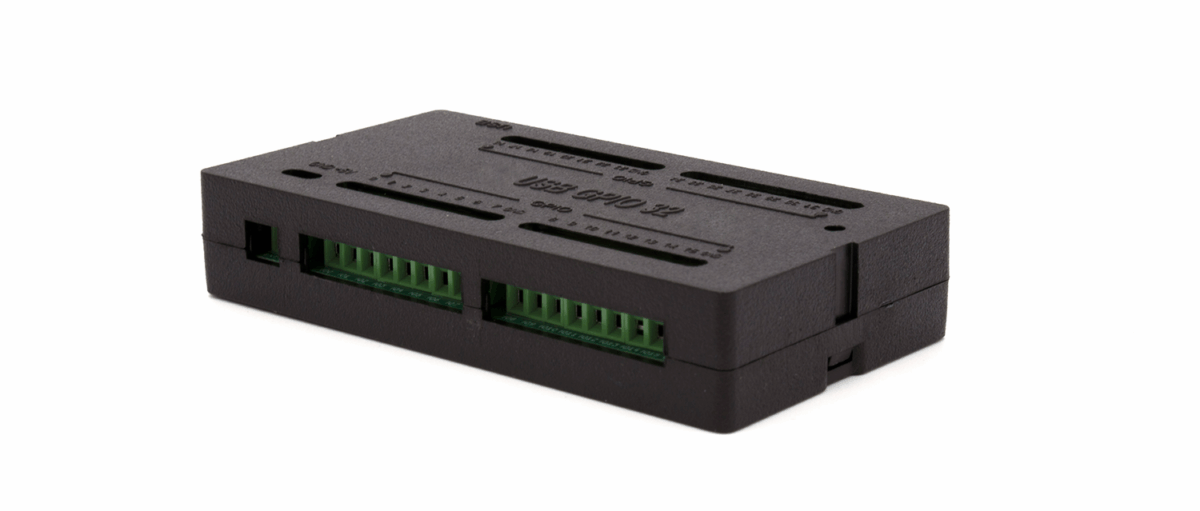
Version 6.31 introduces support for the Digital I/O Extender — an external expansion module designed for SMSEagle NXS and MHD devices. The extender increases the system’s digital input and output capabilities by providing 32 additional configurable digital I/O ports.

Each port can be individually configured as either a digital input or a digital output, allowing flexible adaptation to application requirements. The module connects to the SMSEagle device via a USB interface and is automatically detected by the system.

Black rectangular electronic module with two green screw-terminal blocks on the front.
Once connected:
  • Additional DI/DO ports become available in the rule definition (port number selection)
  • The same rule logic applies as for built-in ports
  • The external I/O device status is visible in Settings > Sysinfo

Typical use cases

  • Extending the number of inputs and outputs when builtin ports are no longer sufficient 
  • Connecting additional I/O sources while using the same rule logic as for built‑in ports
  • Making additional DI/DO ports available in rule definitions
The external DI/DO accesory is offered as a separate product available in our store. 

Incoming Calls

SMSEagle supports handling of incoming voice calls..

What this means for you: incoming calls can be treated as trackable, configurable events – so you can log them, use them as a trigger for Webhooks, and apply a consistent default policy.

Person wearing a cap uses a laptop with a speech bubble showing a waveform, indicating online voice or chat communication.

Incoming calls can be:

  • Logged in the device call history
  • Used as a trigger for Webhooks
  • Configured globally via Settings > Maintenance, where you can set the default device behaviour to: always reject, accept, or ignore incoming calls

Typical use cases

  • When you need incoming calls recorded in call history
  • When you want an incoming call to trigger a webhook (integration entry point)
  • When you need a single global default policy for incoming calls (reject / accept / ignore)

Advanced TTS: Playback Speed Control

For Text to Speech Advanced, playback speed can be adjusted to control how fast the message is read out (slower / normal / faster).

What this means for you: you can control the playback speed of Advanced Text‑to‑Speech voice calls using the built‑in speed setting.

Illustration of a man in a checkered shirt running while talking on a smartphone.

Zabbix API ACK Integration (Webhooks) 

SMSEagle Webhooks now include native integration with the Zabbix API for two‑way alert acknowledgment. When configured:

    • Zabbix sends an alert to recipients via SMSEagle
    • When recipient replies to the SMS, SMSEagle automatically calls the Zabbix API to acknowledge the alert in Zabbix
    • The reply text is added as a comment to the Zabbix problem

Supported authentication methods:

  • API Token (Zabbix ≥ 6.4)
  • Login / Password (older Zabbix versions)

But that's not the end

Alongside the major features, v6.31 introduces several smaller but important enhancements: 

Single OID Value in SNMP Traps

SMSEagle can act as an SNMP trap receiver. For each incoming trap, you can define a rule that triggers an SMS message.

Trap content matching options:

    • Match all OIDs in the trap — alert is triggered whenever a trap from a defined source arrives
    • Match a specific OID value — alert is triggered only when a trap contains a specific OID matching a defined value (equal/not equal/greater/less than)

The single-OID-value match is useful when a device sends multiple OIDs in one trap and you only want to react to a specific one.

SMSEagle also supports displaying the value of a specific OID from an incoming SNMP trap directly in alert messages. You can use a dedicated placeholder to reference a single OID value in the message content, for example: {TRAP:OID_IDENTIFIER}. At runtime, the placeholder is replaced with the actual value received in the SNMP trap.

WhatsApp Support in Cleanup Folders 

  • Cleanup folders now support WhatsApp messages 
  • Makes message management easier in multichannel environments 

Stability and reliability improvements 

This release also includes a broad set of fixes and stability improvements across several core areas of the system:

    • Improvements around calls and messaging address issues related to voice playback handling, SMS delivery behavior, and message resend logic, helping ensure more reliable notifications and consistent message flow.
    • Workflow and automation fixes resolve problems with message length handling, placeholder conversion, and SMS action encoding, improving the predictability and correctness of automated scenarios.
    • Additional fixes cover LDAP group messaging, internal messaging strategies, and plugin‑based features such as Email2SMS, Network Monitor, and DI/DO‑related actions, reducing edge‑case errors during everyday operations.
    • Reliability improvements were also introduced in high‑availability environments, addressing registration and synchronization issues to make HA clusters more stable in production deployments.

Guidance for stable
and predictable operations

Together, these fixes help keep existing installations stable, predictable, and easier to operate, especially in environments with complex alerting and integration requirements. If you want to get the most out of these improvements, the User Manual provides clear examples and configuration guidance.

Do you need
support?

If anything is unclear or you’d like more information, the SMSEagle team is here to help.