Home / Integration plugins / SMS & voice alerts for Kentix KentixONE

+

SMS & voice alerts for Kentix KentixONE

Integrating KentixONE with the SMSEagle hardware SMS gateway lets you deliver alarms from Kentix MultiSensors, access control and SmartPDUs as SMS messages, wake-up ring calls and text-to-speech voice calls (TTS Advanced). KentixONE calls the SMSEagle REST API directly through a webhook, so fire, leak, climate and intrusion alarms reach people even when the network outside the building is down.

Signal message icon

Alerts that get through

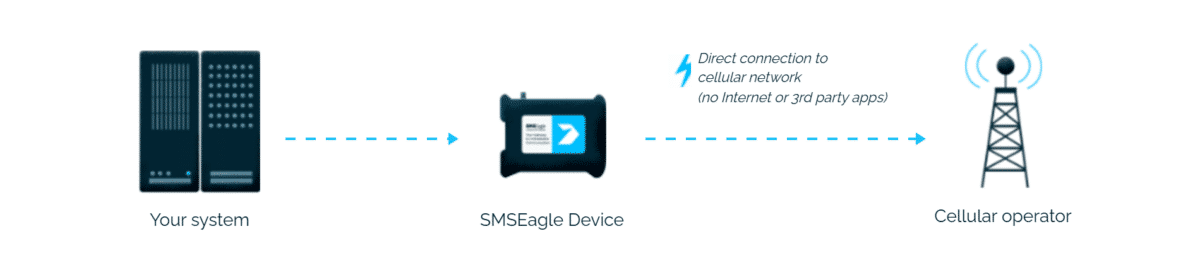
Early fire detection, water ingress or a server room break-in reaches the on-call team by SMS or voice call. SMSEagle sends it straight to the cellular network, independent of mail servers and cloud services.

Long product lifespan icon

Faster incident response

The message contains the alarm zone, device and measured value, taken directly from KentixONE variables. A TTS Advanced call reads it out in the local language, which works well for security staff and technicians on the move.

Customization options icon

SMS for SiteManager and Docker installations

KentixONE running on a SiteManager without a GSM modem or in a Docker container has no SMS channel of its own. SMSEagle adds SMS and voice alerting through the standard webhook feature, with no additional Kentix hardware.

Verified security badge: blue shield outline with a dark circle and white checkmark indicating protection and trust.

Communication you control

KentixONE and SMSEagle both run on-premise. Alarm data, zone names and phone numbers never leave your network, which fits the independence from cloud providers that Kentix customers choose it for.

How it works?

1

Event Trigger

A Kentix device raises an alarm in an alarm group or on a sensor, for example CO rise, leak detected or door forced.

2

Communication

KentixONE runs the assigned webhook, a POST request with a JSON payload to the SMSEagle REST APIv2 over the local network.

3

Alert

SMSEagle sends the SMS and/or places a voice call to the configured recipients or Phonebook group.

How to set up the integration

Requirements

ItemRequirement
KentixONEcurrent version with the Webhooks feature (SiteManager, AlarmManager or Docker)
SMSEagle devicelatest software version recommended
Voice featuresVOICE add-on for the SMSEagle device
Networkaccess from KentixONE to SMSEagle over HTTP (80) or HTTPS (443)

SMSEagle Setup

  1. Create a new API Key in SMSEagle: Settings > API > APIv2 > + Create API Key
  2. Enter a descriptive Key name.
  3. Select Owner.
  4. Set Key enabled.
  5. Grant permissions in Messages: Send SMS.
  6. Grant permissions in Calls (for voice alerting): Make a ring call, Make a TTS Advanced call.
  7. Click Create key.
  8. Copy the new API Key for later use.
  9. For voice calls, open Settings > Calls > TTS local models and note the ID of the voice model you want to use.

KentixONE Setup

  1. In KentixONE open Automation > Webhooks and click Create webhook.
  2. Set Active on and give it a name, for example SMSEagle SMS.
  3. URL: https://IP.OF.YOUR.SMSEAGLE/api/v2/messages/sms (replace IP.OF.YOUR.SMSEAGLE with your actual IP address)
  4. Method: POST. Authentication: No authentication. Content type: application/json.
  5. Payload:
    {
      "access_token": "SMSEAGLE_API_KEY",
      "to": ["+48501234567", "+48501234568"],
      "text": "Kentix alarm: $GROUP_NAME$ / $DEVICE_NAME$ / $ACTIVE_ALARM_SENSOR_NAME$ = $ACTIVE_ALARM_MEASUREMENT_VALUE$"
    }
  6. Save the webhook.
  7. Open the alarm group (or the sensor configuration) and add the webhook as an event handler for the alarm state change.

Optional: voice call webhook

Create a second webhook for critical alarm groups, for example SMSEagle TTS call:

  • URL: https://IP.OF.YOUR.SMSEAGLE/api/v2/calls/tts_advanced (replace IP.OF.YOUR.SMSEAGLE with your actual IP address)
  • Method: POST, Content type: application/json
  • Payload:
    {
      "access_token": "SMSEAGLE_API_KEY",
      "to": ["+48501234567"],
      "text": "Kentix alarm in $GROUP_NAME$. $ACTIVE_ALARM_SENSOR_NAME$ on $DEVICE_NAME$.",
      "voice_id": 2,
      "duration": 30
    }

For a silent wake-up call use /api/v2/calls/ring with {"to": ["+48501234567"], "duration": 20}.

Recipients

Instead of phone numbers you can use SMSEagle Phonebook entries: "groups": [GROUP_ID], for a public group. Replace the GROUP_ID with the actual ID found in the SMSEagle Phonebook. Groups, shift schedules and escalation are then managed on the SMSEagle side.

Test and verify

  1. Point the webhook temporarily to a test endpoint (for example a request inspector) to check the payload after variable substitution.
  2. Switch it back to SMSEagle and trigger a test alarm in an alarm group.
  3. In SMSEagle check Sent messages and Calls > Call history.

Troubleshooting

SymptomCause
HTTP 401invalid or expired API token
HTTP 403API user lacks Send SMS, Make a ring call or Make a TTS Advanced call permission
HTTP 400invalid JSON after variable substitution, for example unescaped quotes in a device name
HTTP 400 on a voice callmissing voice_id, required for TTS Advanced
SSL errorSMSEagle certificate not trusted by KentixONE; install a valid certificate or use HTTP inside an isolated management network
Nothing happenswebhook not active, or not assigned as event handler in the alarm group

Alternative: Email to SMS with no API

If you prefer not to use webhooks, configure the KentixONE SMTP settings to use the SMSEagle IP address on port 25 and add alarm recipients in the format PHONE_NUMBER@SMSEAGLE_IP. Voice follow-up is then set in the SMSEagle Email to SMS rule.

How to monitor KentixONE itself?

KentixONE supervises the building, but it cannot report its own outage. SMSEagle Network Monitor can check the SiteManager or Docker host with Ping/ICMP and an HTTPS check of the KentixONE web interface. If it stops responding, SMSEagle sends an SMS or places a call on its own.

Explore SMSEagle Demo device

SMSEagle is a hardware & software solution that guarantees a swift delivery of your messages to designated recipients, whether it’s for notifications, alerts, or important updates.

After registering to a demo you get a remote access to our physical device NXS-9750.

  • 14-days free trial
  • Access to over 20 functionalities

What is hardware
SMS Gateway?

Learn more about
SMSEagle features