Home / Integration plugins / Icinga SMS Integration

+

Send SMS/voice alerts from Icinga

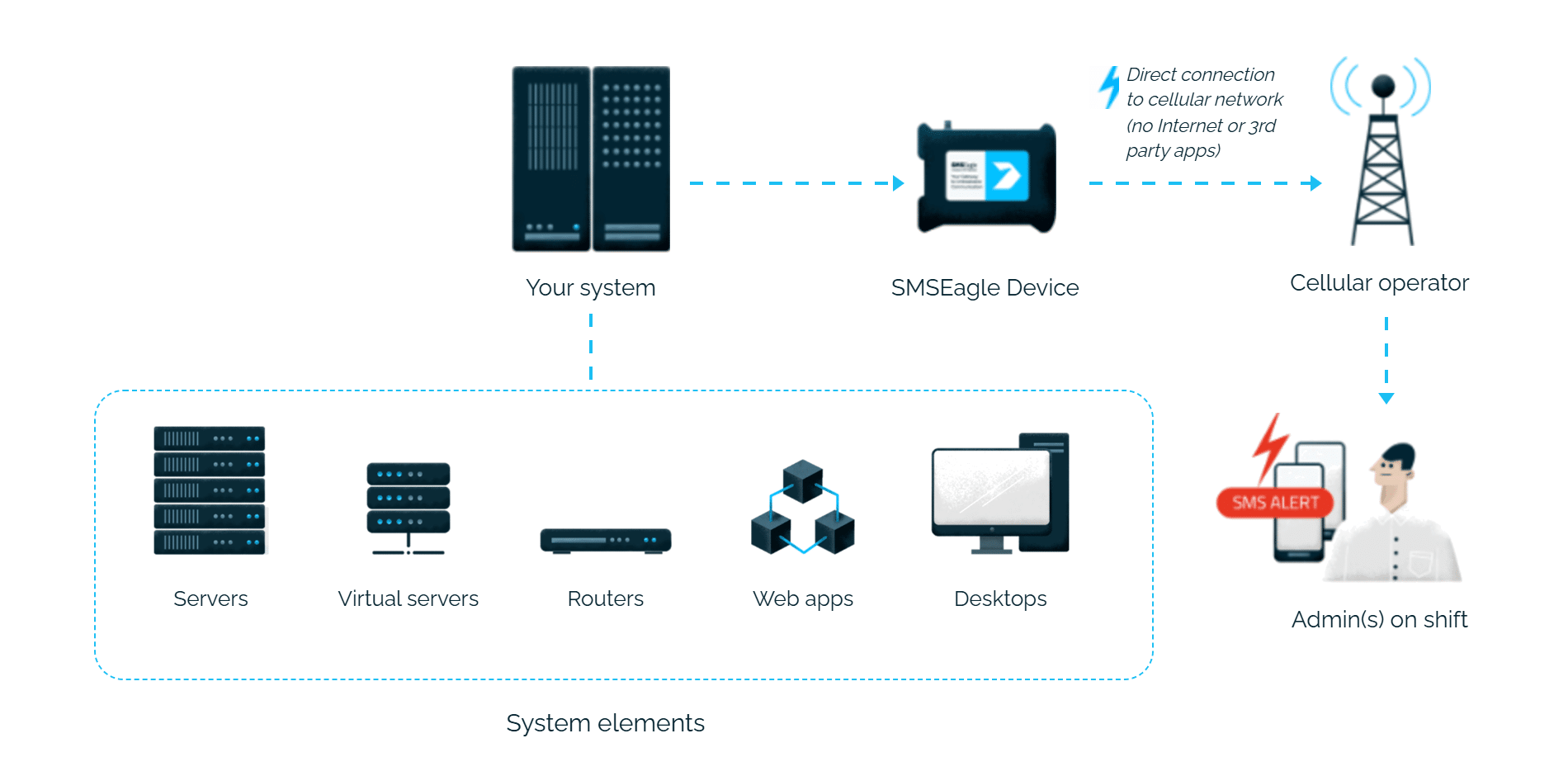
Icinga alerts reach the person on duty as an SMS or a phone call. SMSEagle sends them over its own cellular connection, so they don’t depend on internet access or a cloud service.

A ready script to download

You download the script from the SMSEagle repository on GitHub and copy it to the Icinga server, with no code of your own to write.

Acknowledge a problem by replying to the SMS

The on-call engineer can acknowledge an Icinga host or service problem by replying to the SMS, straight from the phone.

You know what stopped working

Separate notifications for servers and services mean the SMS tells you straight away where the problem is.

How it works

1

Event Trigger

Icinga detects a host or service state change.

2

Communication

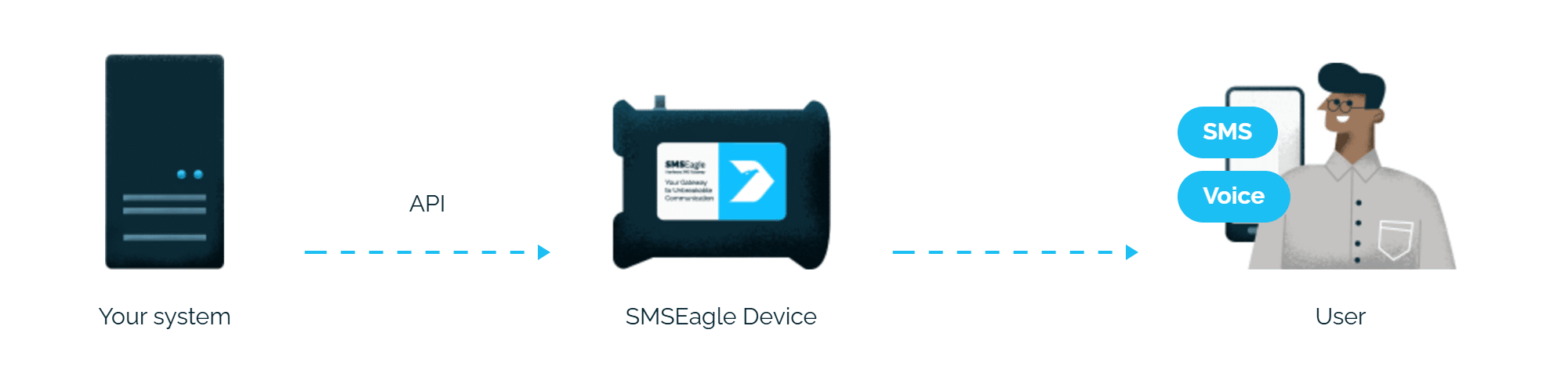
Icinga sends an HTTP API request directly to SMSEagle over your local network.

3

Alert

SMSEagle delivers the alert over its own cellular connection, not through a third-party service, as an SMS or a phone call to the recipient’s phone.

Set up in about 5 minutes

It should take about five minutes to have it up and running. Generate an API token in SMSEagle, define the notification commands in Icinga, and you’re done.

SMSEagle sends Icinga alerts to the right person by SMS or phone call, day and night.

SMS and voice calls from one device

SMSEagle sends Icinga alerts as an SMS, a ring-only call or a call that reads the alert aloud, all from a single device.

Fill-in-the-call-26

If the first person doesn't respond, the alert is sent to the next

Escalation groups and shift schedules make sure the Icinga alert reaches the person on duty, and the next person on the list if nobody responds.

Alerts keep working even if one device fails

Two SMSEagle devices can work as an HA cluster: if one fails, the other takes over sending.

SMSEagle configuration

  1. Create a new user for this script in the SMSEagle web interface: menu System > Users.
  2. Create an API key for that user in Settings > Global settings > API, page API v1:
    • a) click Create API key, fill in Key name and select that user as Owner
    • b) set the APIv1 permissions listed below, then click Create key
The access token is shown only once, right after saving. This API token will be referenced below as SMSEAGLEAPITOKEN. Replace SMSEAGLEAPITOKEN in script below with your value. In the key form, add the permissions for APIv1 methods you want to use:
    • Send SMS => sms
    • Ring call => ring
    • Text-to-speech call => tts
    • Advanced text-to-speech call => tts_adv

Icinga configuration

1. Download latest version of the script notify_eagle_sms.pl from our repository: https://github.com/smseagle/smseagle-nagios
Place the plugin in your Icinga plugins directory.

2. Create the SMS notification commands. (Commonly found in commands.cfg)

3. Replace SMSEAGLEURL with URL Address of your SMSEagle device (for example: http://192.168.50.150)

4. Replace SMSEAGLEAPITOKEN with your API token for your SMSEagle (for example: NZg2yNmWYb5Q7I3Y3Ifnk5E)
(Optional parameter for calls, default: 10) Add -duration parameter with call duration value (in seconds, e.g. -duration 15)
(Required for TTS Advanced) Replace SMSEAGLEVOICE with voice model ID (found in SMSEagle menu, Calls > TTS Voice models)

Define below commands:

define command {
        command_name notify-by-sms 
        command_line $USER1$/notify_eagle_sms.pl -s SMSEAGLEURL -a SMSEAGLEAPITOKEN -dstaddr $CONTACTPAGER$ -t "$NOTIFICATIONTYPE$ $SERVICESTATE$ $SERVICEDESC$ Host($HOSTNAME$) Info($SERVICEOUTPUT$) Date($SHORTDATETIME$)" 
} 

define command { 
        command_name host-notify-by-sms 
        command_line $USER1$/notify_eagle_sms.pl -s SMSEAGLEURL -a SMSEAGLEAPITOKEN -dstaddr $CONTACTPAGER$ -t "$NOTIFICATIONTYPE$ $HOSTSTATE$ Host($HOSTALIAS$) Info($HOSTOUTPUT$) Time($SHORTDATETIME$)" 
}

define command { 
        command_name notify-by-ring-call 
        command_line $USER1$/notify_eagle_sms.pl -s SMSEAGLEURL -a SMSEAGLEAPITOKEN -c ring -dstaddr $CONTACTPAGER$ -t "$NOTIFICATIONTYPE$ $SERVICESTATE$ $SERVICEDESC$ Host($HOSTNAME$) Info($HOSTOUTPUT$) Time($SHORTDATETIME$)" 
}

define command { 
        command_name host-notify-by-ring-call 
        command_line $USER1$/notify_eagle_sms.pl -s SMSEAGLEURL -a SMSEAGLEAPITOKEN -c ring -dstaddr $CONTACTPAGER$ -t "$NOTIFICATIONTYPE$ $HOSTSTATE$ Host($HOSTALIAS$) Info($HOSTOUTPUT$) Time($SHORTDATETIME$)" 
}

define command { 
        command_name notify-by-tts-call 
        command_line $USER1$/notify_eagle_sms.pl -s SMSEAGLEURL -a SMSEAGLEAPITOKEN -c tts -dstaddr $CONTACTPAGER$ -t "$NOTIFICATIONTYPE$ $SERVICESTATE$ $SERVICEDESC$ Host($HOSTALIAS$) Info($HOSTOUTPUT$) Time($SHORTDATETIME$)" 
}

define command { 
        command_name host-notify-by-tts-call 
        command_line $USER1$/notify_eagle_sms.pl -s SMSEAGLEURL -a SMSEAGLEAPITOKEN -c tts -dstaddr $CONTACTPAGER$ -t "$NOTIFICATIONTYPE$ $HOSTSTATE$ Host($HOSTALIAS$) Info($HOSTOUTPUT$) Time($SHORTDATETIME$)" 
}

define command { 
        command_name notify-by-tts-adv-call
        command_line $USER1$/notify_eagle_sms.pl -s SMSEAGLEURL -a SMSEAGLEAPITOKEN -c tts_adv -dstaddr $CONTACTPAGER$ -voiceid SMSEAGLEVOICE -t "$NOTIFICATIONTYPE$ $SERVICESTATE$ $SERVICEDESC$ Host($HOSTALIAS$) Info($HOSTOUTPUT$) Time($SHORTDATETIME$)" 
}

define command { 
        command_name host-notify-by-tts-adv-call
        command_line $USER1$/notify_eagle_sms.pl -s SMSEAGLEURL -a SMSEAGLEAPITOKEN -c tts_adv -dstaddr $CONTACTPAGER$ -voiceid SMSEAGLEVOICE -t "$NOTIFICATIONTYPE$ $HOSTSTATE$ Host($HOSTALIAS$) Info($HOSTOUTPUT$) Time($SHORTDATETIME$)" 
}

3. In your Icinga contacts (commonly found in file contacts.cfg) add the contact. Field “pager” should contain a mobile number for sms alerts in full international format without leading + sign, for example: 48xxxxxxxxx (if your mobile operator requires + sign in a telephone number put 00 instead)

define contact { 
contact_name engineer 
alias Support Engineer 
service_notification_period 24x7 
host_notification_period 24x7 
service_notification_options w,u,c,r 
host_notification_options d,u,r 
service_notification_commands notify-by-email,notify-by-sms 
host_notification_commands host-notify-by-email,host-notify-by-sms 
email engineer@somedomain.com 
pager 48xxxxxxxx 
}

Setup (alternative method)

On Icinga Exchange you can also find a package of scripts than can be used to communicate with SMSEagle:

  • notify_smseagle – sends SMS via an SMSEagle device
  • check_smseagle – checks the GSM/3G/4G signal strength
  • smseagle_ack.cgi – script for the “callback url” function of an SMSEagle device. It parses incoming SMSs and acknowledges host/service problems if an SMS requests that.

Explore SMSEagle Demo device

SMSEagle is a hardware & software solution that guarantees a swift delivery of your messages to designated recipients, whether it’s for notifications, alerts, or important updates.

After registering to a demo you get a remote access to our physical device NXS-9750.

  • 14-days free trial
  • Access to over 20 functionalities

What is hardware
SMS Gateway?

Learn more about
SMSEagle features