

- In SMSEagle, go to Access to API and make sure your APIv2 token has the Send SMS permission (and Send calls, if you also want voice-call alerts).
- For voice calls, note the TTS voice model id under Calls → TTS Voice models.
Combine Grafana’s alerting engine with the reliability of the SMSEagle hardware gateway. Make sure you’re the first to know about a critical incident — even when the very network your monitoring stack depends on is the one that’s down.
Grafana detects the anomaly, but delivering that alert usually depends on your internet connection, an SMTP relay, or a cloud SMS provider. If any of these fail, the notification never arrives. SMSEagle sends alerts directly over the mobile network, so they get through even when your internet link is down.
Grafana and the systems it monitors often run on the same virtualized infrastructure – the same Docker host, the same VM cluster. If that platform goes down, your alerting can go down with it. SMSEagle is dedicated hardware with its own cellular connection. Your alerting gateway doesn’t share fate with the servers around it.
SMSEagle runs on-premises. Alerts aren’t routed through a third-party cloud SMS provider — messages go straight from your own device over the cellular network to the mobile carrier, keeping alert data off external SaaS platforms.
A Grafana alert rule evaluates your metrics or logs and starts firing (e.g. min
(smseagle_modem_signal_strength) <30, or any Prometheus/Loki-based condition).
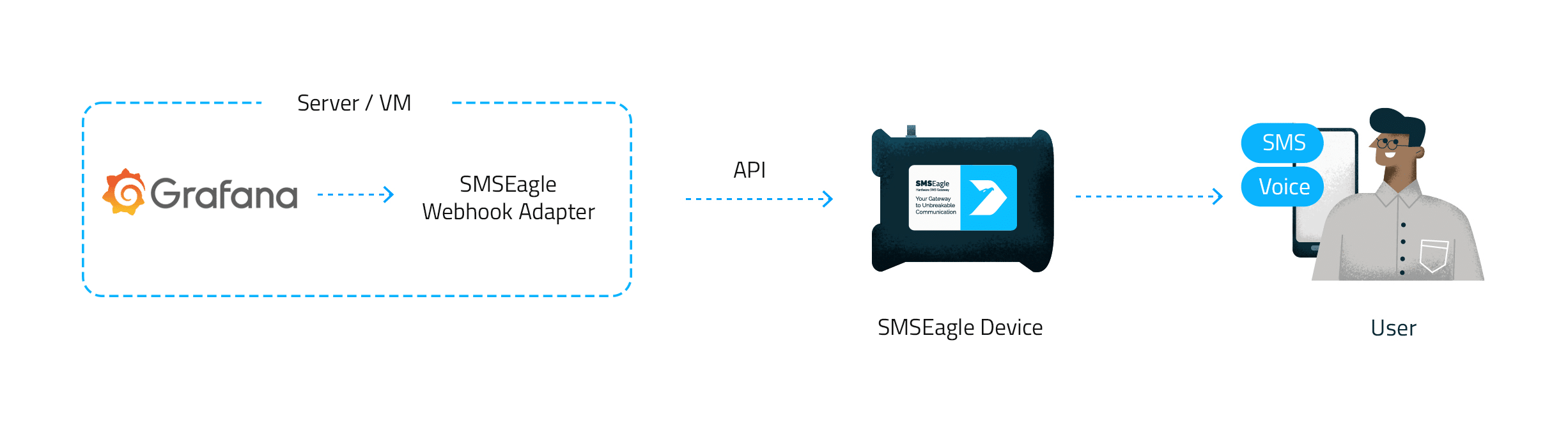
Grafana’s webhook contact point posts the alert notification to “smseagle-alert-webhook” — a small, open-source adapter running next to Grafana that translates it into an SMSEagle APIv2 request.
SMSEagle sends an SMS notification, or places a text-to-speech voice call, to the recipients defined for that alert.
Grafana’s webhook contact point can’t talk to SMSEagle’s API directly — it needs a small translator in between. That translator, smseagle-alert-webhook, is a free, open-source, dependency-free adapter you deploy with a single docer compose up. Point a webhook contact point at it, and every alert rule you already have starts routing to SMS and voice calls — no changes to your rules required.
Not every alert deserves a phone call, and not every call should go to the same person. Add a “smseagle_channel: calllabel” to a high-severity rule and SMSEagle rings the on-call phone with a text-to-speech readout instead of sending a text — much harder to sleep through at 3 a.m. Add smseagle_to: “+3712…,+3712…” to route that specific alert to a different set of numbers, directly from the rule’s Labels section — no code changes, no redeploying the adapter.
Not every alert should go to everyone, and a missed alert shouldn’t go nowhere. SMSEagle lets you define recipient groups so each notification reaches the right team, and escalation groups make sure that if the first person doesn’t acknowledge, the alert moves on to the next responder — combined with on-call shift schedules, so notifications follow your real duty roster instead of a static phone number.
Who watches the watcher? If your Grafana server goes down, it can no longer send a single alert — and you might not find out until it’s too late. With SMSEagle’s built-in Network Monitoring, the gateway independently checks your Grafana server and sends an SMS or voice call the moment it stops responding. Your monitoring platform finally gets a monitor of its own.
SMSEagle’s a hardware SMS gateway. It’s used for sending and receiving notifications directly via the cellular network. The device runs on-premise, which means all data’s stored locally .
Learn how to integrate Grafana with SMSEagle and deliver alerts through SMS messages and voice calls. This step-by-step tutorial covers API token configuration, webhook deployment, Grafana contact point setup, alert rule configuration, and live testing of both SMS and voice notifications.
Before you start: this is a self-hosted-only path. Grafana’s alerting engine must be able to reach the adapter, and the adapter must be able to reach your SMSEagle device on the LAN — so the clean fit is a self-hosted Grafana on the same network as the device. Grafana Cloud cannot reach a private LAN address; for that scenario, use SMSEagle’s Email-to-SMS poller instead.
git clone https://github.com/dmitrylambert/grafana-monitoring.git
cd grafana-monitoring/smseagle-alert-webhook
cp .env.example .env
Edit .env:
SMSEAGLE_API_URL — your device’s IP address or hostnameSMSEAGLE_ACCESS_TOKEN — the APIv2 token from step 1SMSEAGLE_SMS_TO — default recipient number(s) (can be overridden per alert, see below)SMSEAGLE_TEST_MODE=true until you’ve verified everything end to endBuild and start the container:
docker compose up -d --build
curl http://localhost:9099/healthz # -> okSMSEaglehttp://host.docker.internal:9099/ if Grafana runs in Docker on the same host)POSTSMSEAGLE_TEST_MODE=true) to validate without sending a real SMS
smseagle_channel: call for a voice call (omit it, or set sms, for a text), and optionally smseagle_to: +3712... to override recipients for that alert
For a reproducible, GitOps-style setup, copy the example contactpoints.yaml, policies.yaml, and alert-rule.example.yaml files into your Grafana provisioning directory and restart Grafana. Edit the url: in contactpoints.yaml to your adapter’s address first.
Note: policies.yaml provisions the root notification policy — after this, all alerts route to SMSEagle by default, and the Notification Policies page becomes read-only in the UI. If you only want some alerts on SMSEagle, skip this file and add a route in the UI instead (see 3a).
Keep SMSEAGLE_TEST_MODE=true while wiring things up: SMSEagle validates every request but doesn’t deliver it (a test send returns id: 0). Trigger a real alert rule and confirm delivery in docker compose logs -f, then flip the flag to false and rebuild for live delivery.
message, summary, or description annotation, sent or read aloud verbatim, prefixed with PROBLEM. or RESOLVED. — no label dump, no firing counts, so what you type in the rule is exactly what’s delivered.See also the detailed integration guide prepared by the Dmitry Lsmbert, available at: Github.
SMSEagle is a hardware & software solution that guarantees a swift delivery of your messages to designated recipients, whether it’s for notifications, alerts, or important updates.
After registering to a demo you get a remote access to our physical device NXS-9750.


