Your internet can fail. Your FortiGate alerts won't.
An outage is when FortiGate alerts matter most, and when email or cloud notifications can silently fail. SMSEagle is an on-premises hardware SMS gateway that delivers FortiGate alerts as SMS and voice calls over the cellular network, independent of your internet uplink.
Critical security alerts are delivered as SMS within seconds – even when the network is down. Instead of getting lost in a crowded inbox, the alert reaches your on-call team immediately, so response time stays in seconds, not hours.
Escalation until someone responds
If the first responder doesn’t react, SMSEagle escalates the alert to the next person in the chain. Combined with recipient groups, every critical FortiGate event reaches the right people, and keeps going until someone acknowledges it.
Independent & secure channel
SMSEagle removes the dependency on external providers and cloud SMS services. Alerts are sent from your own hardware over the cellular network, keeping sensitive security notifications under your control.
How it works?
1
Event Trigger
FortiGate detects a security event or system issue within the monitored infrastructure, such as a firewall alert.
2
Communication
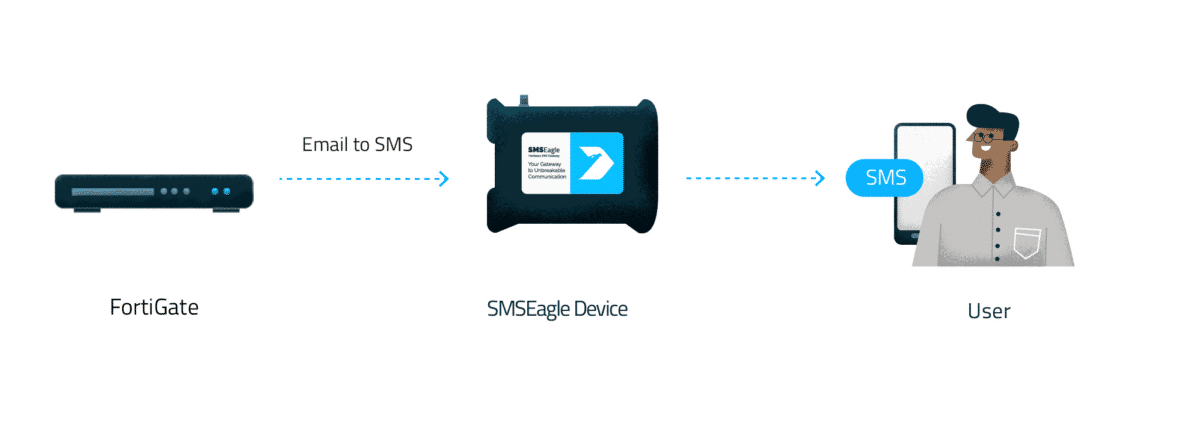
FortiGate sends the alert by email (SMTP) to the SMSEagle device over your local network — no external service involved.
3
Alert
SMSEagle delivers the alert as an SMS or text-to-speech voice call to your on-duty team over the cellular network.
Integrate in 10 minutes
Connect your FortiGate to SMSEagle gateway and start sending alerts via SMS and voice. No complex configuration, no external services, just a simple, reliable setup that works right away.
Maximize the power of FortiGate with complete Out-of-Band alert delivery
Out-of-band incident reporting
Cyberattacks often start where the network ends – at the gateway. If a FortiGate threat coincides with an internet or WAN outage, cloud and email alerting can go dark exactly when you need it. SMSEagle runs as an independent on-premises channel over its own cellular connection, so incident notifications still reach you even when the corporate network is down.
Perimeter-independent alerting hardware
Software-based alerting often runs on the same infrastructure it protects, and a single platform failure can take your notifications down with it. SMSEagle is dedicated hardware, so your alerting gateway doesn’t share fate with the appliances around it. And with built-in Network Monitoring, SMSEagle can actively check your FortiGate over ICMP or SNMP and alert you the moment it stops responding.
High-priority threat escalation
Zero-delay delivery for critical security events. In cybersecurity, every second counts. If FortiGate or FortiAnalyzer detects a severe threat – such as a ransomware outbreak, brute-force attack, or unauthorized admin login – an email notification can easily sit unnoticed in a busy inbox. Routing these high-severity events through SMSEagle triggers instant SMS alerts or voice calls.
SMSEagle configuration
This integration will use Email To SMS plugin (see details: Email To SMS plugin). This plugin is included in each version of SMSEagle device.
Enable Email to SMS in the web interface: Settings > Channels > Email > Email to SMS.
Create a forwarding rule in Automation > Email > Email to SMS. You can forward all emails to SMS or emails from specific domains.
FortiGate Setup
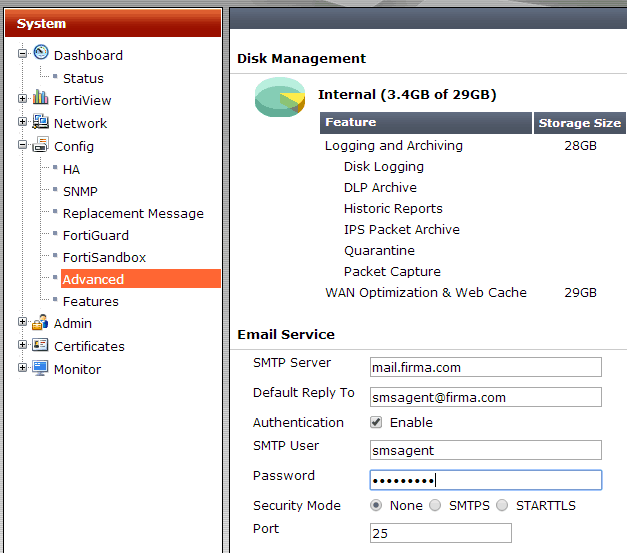
To configure Email setting choose Config -> Advanced from the left menu System.
SMTP server The SMTP server is used to send email notifications to users. Enter the address to the SMTP server you want to use. Note that the SMTP server must be able to accept all the email addresses that you are planning to use. This is the primary SMTP server that will normally be used (you can use SMSEagle as SMTP server).
Default reply to Enter you email address
Authentication Check If your SMTP server requires authentication, enter the username and password in these fields.
Additional settings
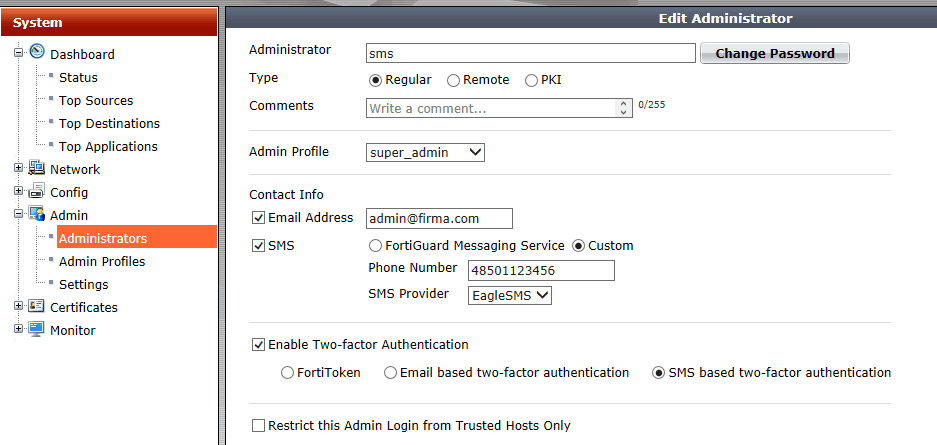
To configure choose Admin -> Administrators from the left menu System.
Contact Info Enter email and phone number.
SMSEagle as SMTP Server (optional)
For sending e-mail messages you can use SMTP server installed on the SMSEagle device. Then the configuration of SMTP server is as follows:
SMTP host: IP address of your device
SMTP port: 25
Authentication: SMSEagle SMTP server doesn’t require authentication
Encryption: none
Notice: SMTP server on the SMSEagle device will accept messages addressed for it only. The other messages will be rejected.
Wake-up Calls & Text-to-speech Calls (optional)
SMSEagle device can be equipped with an additional voice feature that offers wake-up calls for urgent ring-only alerts or text-to-speech calls to convert text alerts into voice calls. Complete the following steps if you want to add a follow-up voice call:
in the SMSEagle web interface: Automation > Email > Email to SMS edit the forwarding rule you created earlier
in the parameter “Call after sending SMS” choose a desired value:
Yes – ring only: SMS will be followed with a wake-up (ring only) call
Yes – text to speech: SMS will be followed with a simple text-to-speech voice call (English language only)
Yes – text to speech (advanced): SMS will be followed with a text-to-speech voice call (better quality & multiple language support)
Notice: Wake-up Calls and Text-to-Speech Calls are only available to users who have purchased the VOICE add-on for their SMSEagle device.
Explore SMSEagle Demo device
SMSEagle is a hardware & software solution that guarantees a swift delivery of your messages to designated recipients, whether it’s for notifications, alerts, or important updates.
After registering to a demo you get a remote access to our physical device NXS-9750.