Escalate a critical alert until someone actually acknowledges it
A single SMS to a single person can go unanswered. Escalation Groups don’t stop at one message – they keep going until someone actually acknowledges it with the stop word.
If the on-call person is asleep, out of coverage or has a flat battery, the alert goes unanswered
Escalation Groups fix this: when nobody acknowledges the alert in the set time, SMSEagle sends it to the next person.
No reply in time? The alert is sent to the next person
If a group member does not acknowledge with the stop word within the interval you set, SMSEagle automatically sends the alert to the next person in the group.
One reply from any group member ends it
A predefined stop word from any group member immediately halts the escalation queue, so the alert does not keep going out.
Set the order and the pace
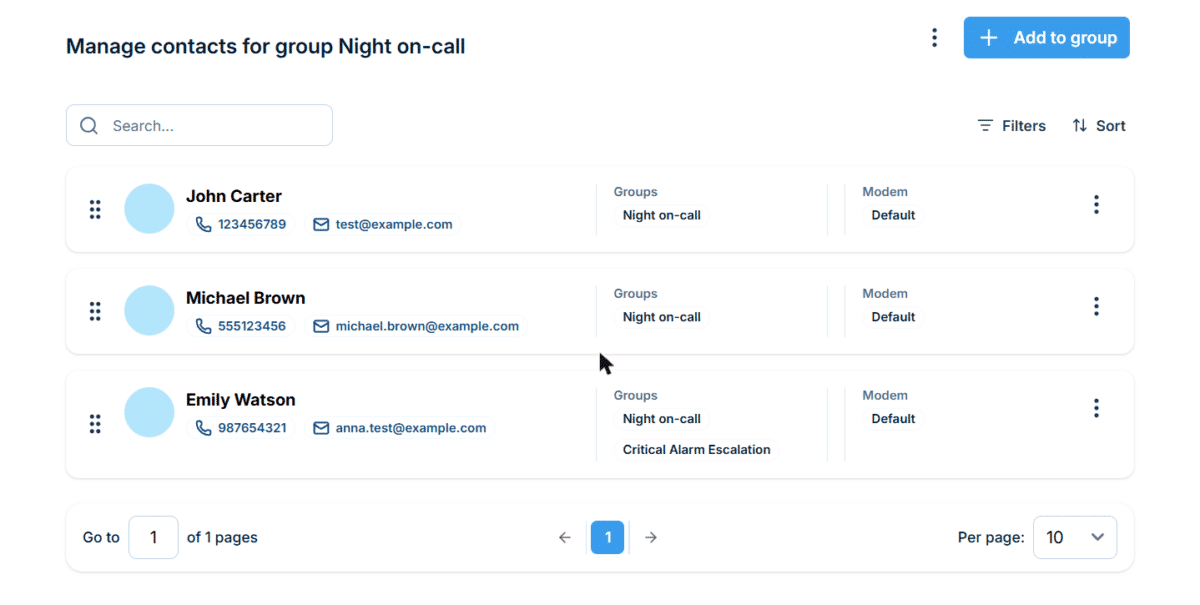
Set the interval between attempts in the group settings, and drag group members into the order they are contacted in.
An escalation group is a Phonebook group with two extra settings: the time between messages and a stop word.
Control exactly who is contacted, and when
Set the order group members are escalated in
Add people to the group and arrange the order they will be contacted in, from first responder to last resort.
One alert, sent the right way
Send an SMS to the group like normal
Send an alert to the escalation group, from Compose, the API, Email to SMS, or any automation rule, and SMSEagle handles the rest, moving to the next person automatically if nobody acknowledges.
Acknowledge it, and it is done
Stop the queue with a single reply
Any group member can reply with the stop word to halt the escalation immediately, confirming the alert was handled.
See exactly where things stand
Watch and control an escalation while it is running
Check which member the alert is currently on, and step in manually if you need to.
SMSEagle combines hardware and software into a single, self-contained gateway. It is designed for critical environments, so security is built in from the ground up, confirmed by CE, FCC, ISED, UKCA, PTCRB, RCM, IMDA, TDRA, CB Scheme, GCF, carrier certifications (Verizon, AT&T) and ISO 27001.
An alert is sent to the first group member; if there is no acknowledgement with the stop word within the set interval, it automatically goes to the next member, and so on.
How do I stop an escalation once it starts?
Any group member replies with the predefined stop word, and the escalation queue halts immediately. You can also stop it manually by clicking Stop escalation in the Escalation queue view.
Can I set the order group members are contacted in?
Yes. Open Manage contacts for the group and drag the contacts into the order they should be alerted in.
Can I control the time between each escalation step?
Yes. The Interval setting defines the time between messages to consecutive group members.
Is an escalation group different from a normal Phonebook group?
It is the same group type with two extra properties: Interval and Stop word.
Which SMSEagle devices support Escalation Groups?
Escalation Groups is a built-in feature available on all current SMSEagle hardware SMS gateways.