Home / Integration plugins / Prometheus Alertmanager SMS & voice call notifications
Prometheus logo, a plus sign, and the SMS Eagle logo indicating a collaboration between Prometheus and SMS Eagle.

Prometheus Alertmanager SMS & voice call notifications.

Combine Prometheus and Alertmanager’s alerting engine with the reliability of the SMSEagle hardware gateway. Make sure the right person hears about a critical incident — even when the network your monitoring stack depends on is the one that’s down.

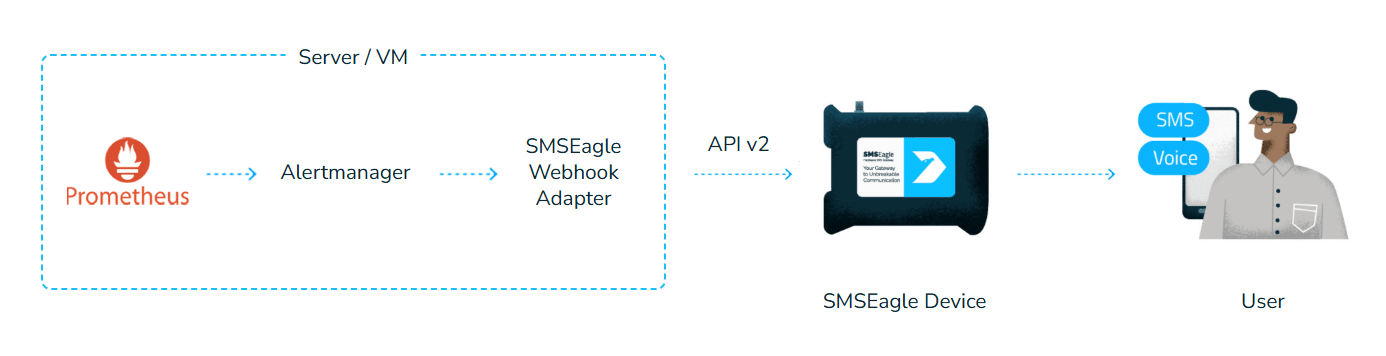
Flow diagram: Prometheus → Alertmanager → SMSEagle Webhook Adapter in a server/VM → API v2 → SMSEagle device → user (SMS/Voice).

Benefits

Verified security badge: blue shield outline with a dark circle and white checkmark indicating protection and trust.

Internet-independent alerting

Prometheus and Alertmanager detect the anomaly, but delivering that alert usually depends on your internet connection, an SMTP relay, or a cloud SMS provider. If any of these fail, the notification never arrives. SMSEagle sends alerts directly over the mobile network, so they get through even when your internet link is down.

Standalone hardware

Prometheus, Alertmanager, and the systems they monitor often run on the same cluster — frequently the very Kubernetes cluster the alert is about. If that platform goes down, your alerting can go down with it. SMSEagle is dedicated hardware with its own cellular connection, so your alerting gateway doesn’t share fate with the infrastructure around it.

Communication tower emitting radio waves from a tall antenna structure

No cloud, full data control

SMSEagle runs on-premises. No external connection to a third-party system is required — notifications are generated on-premise and sent directly to the cellular network, which also makes this a fit for secure, offline installations without internet access.

How it works?

1

Event Trigger

A Prometheus rule crosses its threshold and fires; Alertmanager receives, groups, and deduplicates it as usual.

2

Communication

Alertmanager’s webhook receiver posts the alert group (schema v4) to smseagle-adapter — a lightweight, official, open-source adapter that maps the payload to an SMSEagle APIv2 call.

3

Alert

SMSEagle sends an SMS, or places a text-to-speech call for critical severities, to the recipients resolved for that alert.

Diagram of a monitored IT infrastructure showing servers, applications, databases, logs, and network devices; Prometheus alert rules feed Alertmanager and an SMS Eagle device for SMS alerts to on-call staff via cellular network.

Integrate in about 15 minutes

Alertmanager has no native SMS channel — the canonical pattern for anything outside its built-in integrations is webhook_config pointed at a thin proxy. smseagle-adapter is exactly that: a free, official, open-source adapter you deploy with a single docker compose up. Add one receiver to your existing alertmanager.yml, and your current alert routing starts reaching phones by SMS and voice — no changes to your Prometheus rules.

Monitoring is just the beginning.
Take full control of alerts and automation.

Severity-based and per-alert routing

Not every alert should reach the same person, and not every one deserves a phone call. Map severities to recipients once (SMSEAGLE_ROUTES=critical=+48…,oncall-group;warning=noc-group) and every rule with a matching severity label routes itself — no per-rule configuration needed. Need an exception? Add a “smseagle_to label” to a specific Prometheus rule and it overrides the severity routing for that alert alone.

Illustration of a person using a device to connect a team via a branching network diagram and a gateway device labeled SMS Eagle, representing unified communication.
Woman typing at a laptop with orange chain links forming a network above the monitor.

Built for alert storms

A flapping cluster can fire dozens of alerts in seconds — nobody wants dozens of texts for one incident. Switch “MESSAGE_MODE” to summary and set a “MAX_INDIVIDUAL_ALERTS” threshold, and the adapter automatically collapses a storm into a single, readable SMS instead of flooding the recipient. 

Voice escalation for critical alerts

Set “ESCALATE_CALL_SEVERITIES=critical” and any firing alert at that severity automatically triggers a TTS Advanced voice call in addition to the SMS — much harder to sleep through than a silent notification, with zero extra configuration per rule. Call length and voice model are configurable (TTS_CALL_DURATION, TTS_VOICE_ID), so the escalation call can match your team’s preference. 

Manage Group dialog: form to rename a group and configure public/escillation settings, interval, and stop word, with Save and Cancel buttons.

Recipient and escalation groups

Not every alert should go to everyone, and a missed alert shouldn’t go nowhere. SMSEagle Phonebook groups let a single route resolve to a whole team, and escalation groups make sure that if the first person doesn’t acknowledge, the alert moves on to the next responder — combined with on-call shift schedules, so notifications follow your real duty roster.

Monitor Prometheus and Alertmanager themselves

Who watches the watcher? If Alertmanager itself goes down, it can no longer deliver a single alert — and you might not find out until it’s too late. With SMSEagle’s built-in Network Monitoring, the gateway independently checks your Prometheus/Alertmanager hosts and sends an SMS or voice call the moment either stops responding.

Add Monitoring Task dialog with fields for task name (Prometheus monitoring), host localhost, TCP test on port 443, 30s timeout, Always on, and Save/Cancel buttons.

About SMSEagle

SMSEagle’s a hardware SMS gateway. It’s used for sending and receiving notifications directly via the cellular network. The device runs on-premise, which means all data’s stored locally .

How to set up the integration

Before you start: Alertmanager must be able to reach the adapter over the network, and the adapter must be able to reach your SMSEagle device. Since Prometheus/Alertmanager stacks are typically self-hosted already, this is usually just a matter of getting the container onto the same network — no cloud caveat here.

1. SMSEagle Setup

  • Create a new user in SMSEagle (menu Users > + Add Users, user access level: “User”).
  • Grant API access to the created user:
  • click Access to API beside the newly created user
  • Enable APIv2
  • Generate new token
  • For text messages, add access permissions in section Messages for: Send SMS, Send MMS.
  • For voice call alerting, add access permissions in section Calls for: Make a TTS Advanced call.
  • Save settings

2. Deploy the adapter

git clone https://github.com/smseagle/alertmanager-sms-calls.git
cd alertmanager-sms-callsenv

Fill in docker-compose.yml:

VariableDescription
SMSEAGLE_URLdevice address, e.g. https://192.168.1.101
SMSEAGLE_TOKENthe APIv2 token from step 1
SMSEAGLE_VERIFY_TLStrue/false (SMSEagle devices often use a self-signed cert)
ADAPTER_WEBHOOK_TOKENbearer token protecting the adapter’s inbound endpoint (required)
SMSEAGLE_DEFAULT_RECIPIENTSdefault recipient(s) — number or Phonebook group
SMSEAGLE_ROUTESseverity-based routing, e.g. critical=+48...,oncall-group;warning=noc-group
MESSAGE_MODEone_per_alert or summary
MAX_INDIVIDUAL_ALERTSthreshold for switching to a single summary SMS
ESCALATE_CALL_SEVERITIESseverities that also trigger a TTS Advanced call
TTS_CALL_DURATIONcall duration in seconds (default 20)
TTS_VOICE_IDvoice model ID for the TTS Advanced call (default 2; see the Web-GUI for the IDs available on your device)

Build and start the container:

docker compose up -d --build

3. Configure Alertmanager

Add a receiver pointing at the adapter to your existing alertmanager.yml (a ready-to-adapt fragment ships in examples/alertmanager-example.yml):

    • Set url to wherever the adapter is reachable from Alertmanager — e.g. http://smseagle-adapter:8080/alert on the same Docker Compose network.
    • Set http_config.authorization.credentials to the same value as ADAPTER_WEBHOOK_TOKEN — Alertmanager sends it as Authorization: Bearer <token>, which the adapter requires.
    • Keep send_resolved: true if you also want [RESOLVED] notifications, and max_alerts: 0 so Alertmanager doesn’t truncate large alert groups before they reach the adapter — storm handling is the adapter’s job (MESSAGE_MODE/MAX_INDIVIDUAL_ALERTS), not Alertmanager’s.
    • Use matchers/routes to send only specific alerts to the smseagle receiver, or route entirely by severity inside the adapter via SMSEAGLE_ROUTES — both patterns are in the example file.

Validate and reload:

amtool check-config alertmanager.yml
# then reload/restart Alertmanager, or send SIGHUP / POST /-/reload

4. Test it end to end

Trigger a real alert and check the adapter logs for SMS -> ... / TTS call -> ... lines, and Alertmanager’s Status page for the receiver’s last notify attempt.

Good to know

  • A recipient is either a phone number (+48...) or a Phonebook group name — same field, two use cases.
  • smseagle_to on a specific Prometheus rule always overrides severity-based routing for that alert.
  • The adapter refuses to start without ADAPTER_WEBHOOK_TOKEN (its inbound /alert endpoint requires that bearer token) — it’s only meant to be disabled with ALLOW_UNAUTHENTICATED_WEBHOOK=true on a fully isolated, trusted network.
  • Officially built and maintained by the SMSEagle team, MIT-licensed, with an automated test suite: github.com/smseagle/alertmanager-sms-calls

Explore SMSEagle Demo device

SMSEagle is a hardware & software solution that guarantees a swift delivery of your messages to designated recipients, whether it’s for notifications, alerts, or important updates.

After registering to a demo you get a remote access to our physical device NXS-9750.

  • 14-days free trial
  • Access to over 20 functionalities

What is hardware
SMS Gateway?

Learn more about
SMSEagle features